SEO & GEO#ecommerce traffic#ecommerce traffic sources#how to increase ecommerce traffic#ecommerce website traffic
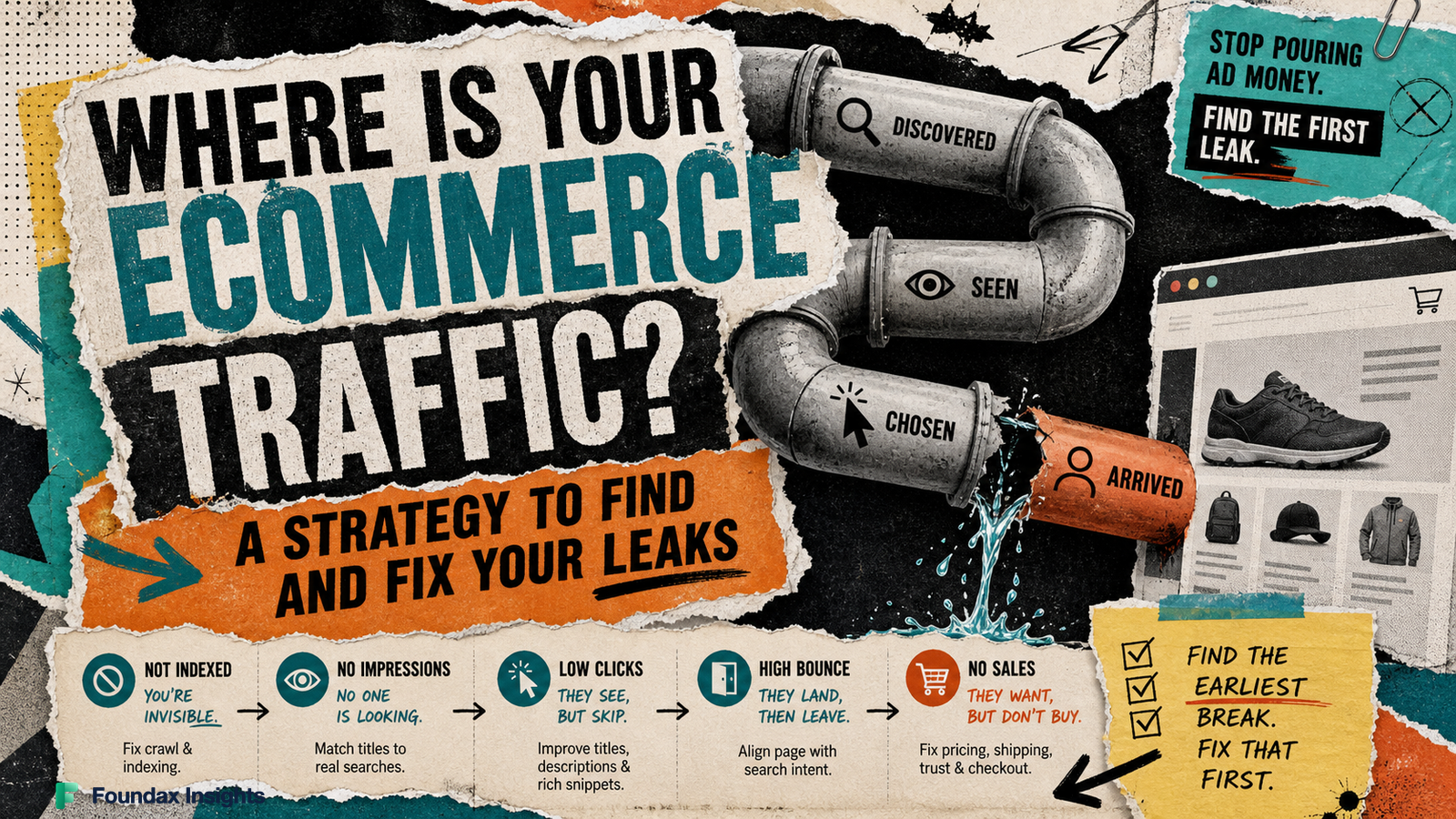
Where Is Your Ecommerce Traffic? A Strategy to Find and Fix Your Leaks
A new online store doesn't automatically attract buyers. Before you spend more money on ads, use this decision framework to diagnose where your store is losing visibility, understand different traffic sources, and route your efforts to the right channels.
When a new online store launches to silence, operators often react by panic-buying ads or rewriting product descriptions at random. But absent or flat ecommerce traffic is not a single problem you can fix with a broad marketing campaign. It is a sequence of highly specific, observable failures.
Before a customer can buy, a search engine must discover and index your page, a human must see your link in search results, that human must choose your link over competitors, and your landing page must satisfy their intent. If there is a break at step one, spending time optimizing step four is a waste of capital.
Your immediate job is to trace the flow of visitors from discoverability to arrival, find the earliest observable break, and run the smallest test that proves or disproves your theory.
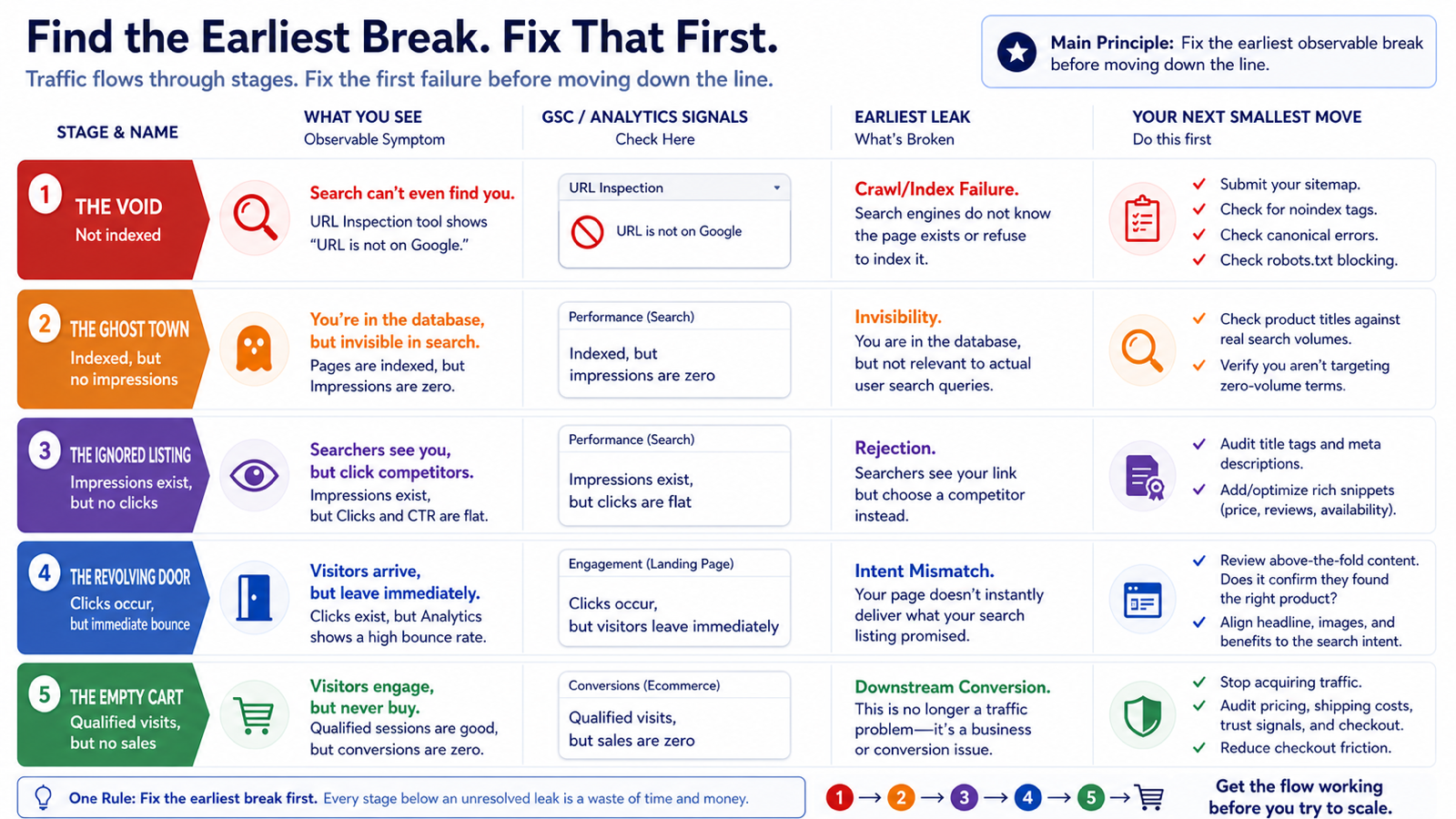
The Traffic-Stage Decision Map
To diagnose your ecommerce website traffic, map your store's current state against this sequence using Google Search Console (GSC) and your web analytics platform. You must fix the earliest failure before worrying about the stages below it.
Observable Symptom
GSC / Analytics Status
The Primary Leak
Your Next Smallest Move
The Void
URL Inspection tool shows "URL is not on Google."
Crawl/Index Failure. Search engines do not know the page exists or refuse to index it.
Submit your sitemap. Check for noindex tags, canonical errors, or blocked robots.txt rules.
The Ghost Town
Pages are indexed, but Impressions are zero.
Invisibility. You are in the database, but you are not relevant to actual user search queries.
Check your product titles against real search volumes. Verify you aren't targeting zero-volume terms.
The Ignored Listing
Impressions exist, but Clicks and CTR are flat.
Rejection. Searchers see your link but click a competitor.
Audit your title tags, meta descriptions, and rich snippet formatting (price, reviews) against the current SERP winners.
The Revolving Door
Clicks occur, but Analytics shows an immediate bounce.
Intent Mismatch. Your page does not immediately deliver what your search listing promised.
Review the landing page above the fold. Does it instantly confirm they found the right product?
The Empty Cart
Qualified visits happen, session durations are good, but sales are zero.
Downstream Conversion. This is no longer a traffic problem.
Stage 1: Diagnosing the Technical and Visibility Gaps
The earliest break happens before a user ever searches. If Google's crawlers cannot find, render, or index your category and product pages, your traffic ceiling is zero. Start with the GSC URL Inspection tool. If your core products are not indexed, stop reading marketing guides and fix your site architecture, sitemaps, and indexing requests before moving further down the technical search funnel to ask, “why is my website not getting traffic?”
Once indexed, you enter the visibility phase. According to Google’s standard definitions, an impression is recorded when your link appears in a user's search results, even if they don't scroll down to see it.
If your pages are indexed but impressions remain at zero, you likely have an intent mismatch. Small merchants often name products something clever (e.g., "The Midnight Wanderer") rather than something searchable (e.g., "Men's Black Leather Hiking Boots"). Google knows your page exists, but human beings are not typing your clever names into search bars. (Note: If your store is brand new, zero impressions may simply be a reporting lag. Google's updated Search Console Insights helps newer properties identify early traction markers, but you still need patience for initial organic data to populate).
Stage 2: Sealing the Click-Through Leak
If you have steady impressions but zero clicks, your leak is on the Search Engine Results Page (SERP). You have achieved visibility but failed to generate interest. Searchers are looking right at your listing and scrolling past it.
This is an alignment and presentation failure. Your title tag may be truncated, your meta description might be dull, or your listing lacks the product rich snippets (price, availability, star ratings) that your competitors feature prominently.
If you use Foundax, this is where its localized SEO and observability surfaces do the heavy lifting. While the platform does not manufacture search demand or guarantee indexing, it allows you to edit page SEO fields by locale, inspect product SEO projections, and visually maintain your site's SEO metadata to ensure alignment. Fixing this leak means ensuring that when your store does appear, it presents a complete, clickable invitation.
Stage 3: The Bounded Cold-Start Experiment
Organic search diagnosis requires weeks of data collection. If your store is brand new or you suspect your SERP presentation is fine but you simply lack domain authority, you face the cold-start problem: Are you failing because the store is broken, or because you simply haven't been seen yet?
To find out, you need a bounded data-buying experiment. The Intuit 2025 Small Business Advertising Trends Report indicates that established small businesses typically spread their marketing across three to four distinct advertising channels. As a new operator diagnosing a traffic leak, you must do the exact opposite. Do not launch a complex, multi-channel campaign; instead, use a single, tightly controlled paid channel strictly as a diagnostic tool to bypass the organic wait time.
Set a strict, unchangeable budget (e.g., $150 to $200) on highly specific, high-intent paid search keywords.
The criteria for the test:
The Goal: Do not evaluate the campaign on immediate profitability. You are buying 100 to 200 guaranteed clicks to observe baseline user behavior.
Defining a Qualified Visit: Look for visitors who spend at least 60 seconds on the site, scroll through multiple product images, click to view sizing charts or specifications, or add items to a cart.
The Decision Matrix: If your paid traffic yields qualified visits and adds-to-cart, your site and product-market fit are functional; your primary bottleneck is simply top-of-funnel traffic generation. If your highly targeted paid traffic immediately bounces, your landing page or offer is the leak, and organic traffic will behave exactly the same way once it eventually arrives. The inference must stop here: a successful diagnostic test proves the page functions for users, not that scaling a massive ad budget will automatically be profitable.
If your bounded test confirms the landing page works but you do not have the capital to sustain paid acquisition, your next focus should be learning how to promote a new website through targeted, non-paid channels.
When to Stop Looking for Traffic
The most expensive mistake in ecommerce is pouring expensive traffic into a leaky bucket.
If your analytics show that users are arriving, acting as qualified visitors (viewing multiple photos, reading reviews, opening shipping policies), but never initiating a checkout, stop trying to increase your traffic.
You have successfully solved the acquisition problem. The diagnosis now shifts from marketing to operations. When qualified visitors refuse to buy, the friction usually lies in uncompetitive pricing, unexpectedly high shipping costs, a lack of trusted payment gateways, or a broken mobile checkout experience. Route your capital into investigating downstream conversion roadblocks before you spend another dollar driving new visitors to the storefront.
Frequently Asked Questions
My store is brand new. How can I tell if Google even knows my website exists?
The earliest potential traffic break happens before users ever search, when search engines fail to discover or index your pages. If crawlers cannot render your pages, your organic traffic ceiling is zero. Use the Google Search Console (GSC) URL Inspection tool to see if your core product pages are listed; if they show "URL is not on Google," immediately submit your sitemap and fix any canonical errors or blocked robots.txt rules.
My pages are indexed and getting impressions in search results, but nobody is clicking. What is wrong?
If you have steady impressions but flat clicks, searchers are seeing your link in the results but actively choosing a competitor instead. This indicates a presentation failure on the Search Engine Results Page (SERP), such as a truncated title tag, a dull meta description, or missing rich snippets for pricing and reviews. Audit your title tags, meta descriptions, and rich snippet formatting against current competitors on the first page of search results to present a complete, clickable invitation.
Should I run a large multi-channel ad campaign to generate initial traffic for my new store?
No, as a new operator trying to diagnose a traffic leak or solve the cold-start problem, you should do the exact opposite. A complex, multi-channel campaign will obscure the data you need; instead, you must use a single, tightly controlled paid channel strictly as a diagnostic tool. Set a strict, unchangeable budget (e.g., $150 to $200) on highly specific keywords to buy 100 to 200 guaranteed clicks, and observe if those specific visitors exhibit qualified behavior like scrolling or adding to cart.