DTC Sites vs Marketplaces in Agentic Commerce
Agentic commerce gives marketplaces new distribution power, but DTC sites remain the place where brands control product facts, trust, customer data, and measurement.
Read more
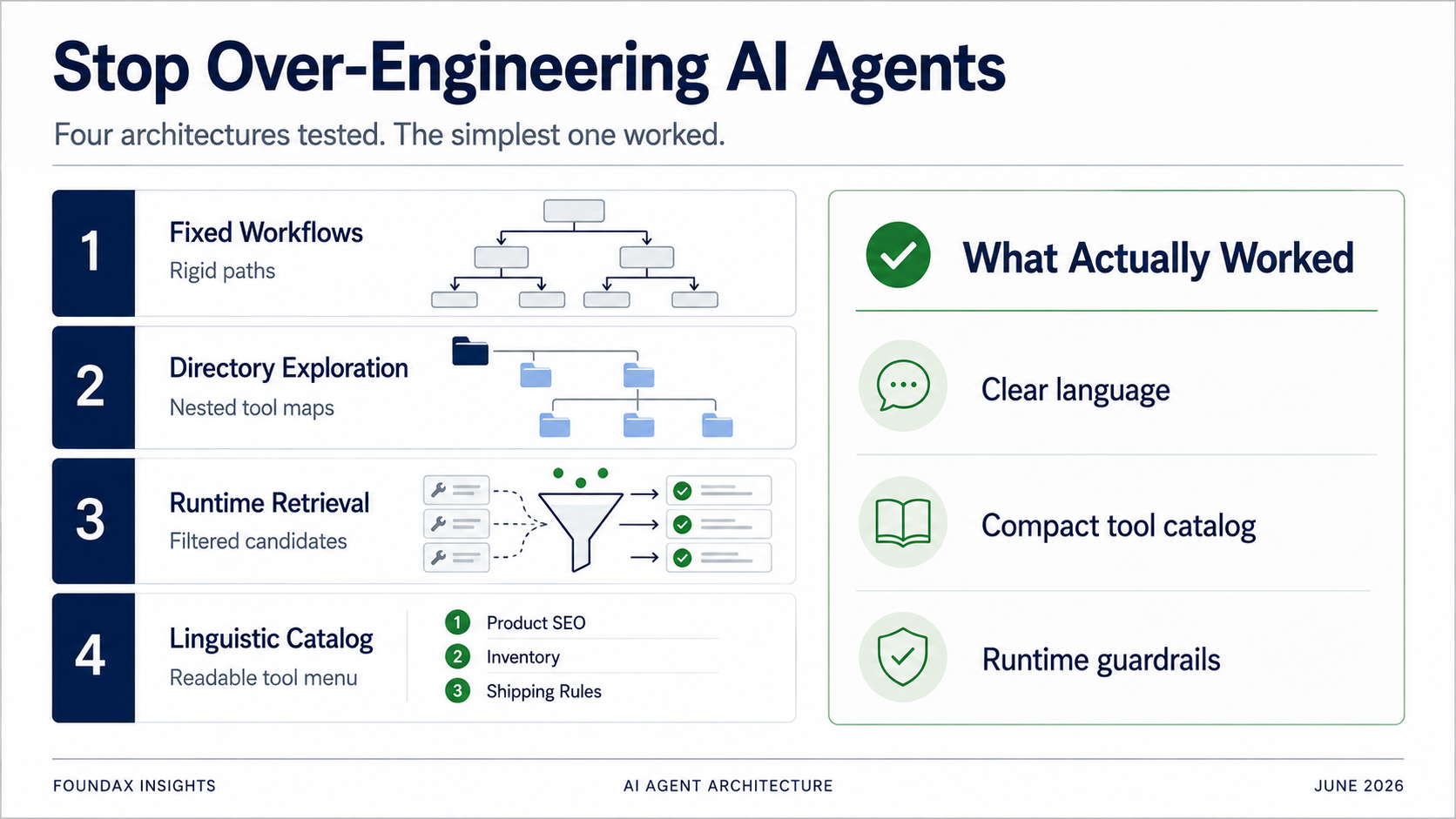
Four Agent architectures, from fixed workflows to a lightweight linguistic catalog. Every 'optimization' was really us doing the model's job for it. The winning architecture was the one that stopped trying to be clever.
There's an absurd moment from building Foundax Agent that I keep coming back to.
We tried a lot of architectures. Fixed workflows. Directory-based tool exploration. Skill-based tool recommendation. Runtime retrieval. Regex matching. Structured plans. Multi-round ReAct loops. At one point, we even seriously considered embedding-based retrieval.
Each version made sense on paper.
Too many tools, so we need to filter. The model misses things, so we need to constrain. Context is too long, so we need to retrieve. Execution must be safe, so we need to proceduralize. Business precision demands atomic bottom-layer tools.
Taken individually, none of these judgments were wrong.
But then we ran the simplest — almost crude — test: compress all tools into a lightweight linguistic catalog, throw it at the model, and let it read and choose for itself.
The result was surprisingly good.
I was genuinely speechless.
Because it meant that most of our complex designs weren't unlocking the model's capabilities. They were assuming the model would fail, then wrapping it in layers of architecture to compensate.
This article isn't saying "exposing all tools is the best practice."
What I really want to say is this: the biggest danger in building a business Agent isn't that the model isn't smart enough — it's that you start designing a cage for it before you've even tested what it can do in your domain.
Foundax is an ecommerce SaaS platform.
So Foundax Agent isn't dealing with casual chat or general knowledge Q&A. It's dealing with the real operational problems merchants face in their backend.
Merchants don't say:
"Please call the product variant read API."
They say:
"Why isn't this product selling?"
"Is my Spanish page set up yet?"
"Can this product run on Google Shopping?"
"Why are people adding to cart but not paying?"
"Fill in my missing SEO."
These questions sound like natural language, but behind each one is an entire business system. Products, SKUs, inventory, pricing, SEO, translations, promotions, shipping, payment, checkout, orders, refunds, GMC feeds, storefront display state — any one of these could affect the outcome.
So Foundax Agent's goal isn't to "sound human."
What it actually needs to do is: understand the merchant's real intent, find the corresponding facts in the system, select the right tools, prepare writes when necessary, and execute under runtime constraints — with permissions, confirmation, and readback in place.
User input can be fuzzy. System execution must be precise.
That tension is the starting point for every architectural dilemma that follows.
I've got an engineering perfectionist streak.
So when I started designing Foundax Agent, I instinctively rejected coarse-grained tools.
A tool called analyzeProductReadiness sounds convenient. But what fields is it reading internally? What criteria is it applying? Where are the permission boundaries? Can you readback after a write? All of that becomes opaque.
Foundax isn't a demo. When a merchant asks you to fix their SEO, you can't have a black-box tool silently changing things in the background.
So I insisted on atomic bottom-layer tools:
Read product base fields. Read product variants. Read inventory and pricing. Read product SEO. Read product translations. Read shipping configuration. Read payment configuration. Write a specific field. Write content for a specific locale. Generate a modification draft. Readback after write.
Every tool single-purpose, clean, non-overlapping. Precise execution, clear permissions, easy to test.
I still think this judgment was right.
The real problem was something else: the more atomic your bottom-layer tools, the more tools you have. The more tools you have, the harder it is for the model to understand and select them in context.
That was the first paradox.
The more a bottom-layer tool suits system execution, the less it suits the model's cognitive interface.
Atomicity wasn't the mistake. The mistake was dumping a pile of atomic tools directly in front of the model and expecting it to consistently pick the right ones.
To solve the tool selection problem, our first attempt was fixed workflows.
This was a natural instinct. If the merchants' high-frequency tasks are finite, pre-script them.
Product SEO check. Translation coverage check. Product launch launch check. Low conversion diagnosis. GMC preflight check.
The model's job was to identify user intent, map it to a workflow, then hand off to the runtime for fixed execution.
This looked safe. It looked engineered.
But in testing, it quickly degenerated into a dumb keyword system.
User expression is too varied. One person says "is my SEO complete?" Another says "can Google index this page?" Another says "did I mess up the product title?" Another says "why does my feed keep erroring when I run ads?"
To make every variation hit a task, you keep adding keywords, aliases, rules. Eventually the system isn't accurate, and it's harder to maintain than ever.
More importantly, the model had almost no room to operate. It was just an intent classifier. The actual analysis path, tool selection, evidence-gathering sequence — all pre-determined by us.
That's when it hit me:
If every task is pre-scripted into a workflow, the thing is no longer an Agent — it's a workflow tool wearing an AI costume.
Fixed workflows, at their core, replace model reasoning with human business enumeration. They make the system more controllable, but they strip the Agent of its Agency.
Next, we pivoted.
Instead of dumping all tools at once, organize them into a directory. The model picks a business domain first, then expands subdirectories, then selects specific tools.
Products. Orders. Payments. Shipping. Promotions. Analytics. GMC.
Under "Products": base info, SKUs, inventory, pricing, SEO, translations.
This was much more accurate than fixed workflows. The model wasn't matching keywords to a predefined path — it was exploring a structured tool map. It genuinely found the right tools more often.
But the problem was obvious: speed.
Every task required directory traversal. Simple questions still went through the exploration chain. Token consumption was high. Latency was high.
A merchant asks "is this product's SEO complete?" and the Agent behaves like it's flipping through a thick backend manual.
Directory exploration wasn't wrong in direction. The problem was that it turned "understanding the tool system" into a per-invocation cost. The model had to re-explore the system from scratch every single time, which is hard to accept as a product experience.
Next, we built something more sophisticated.
The model first produces a structured understanding of the user prompt: intent decomposition, keywords, business domains involved, and whether the task is read, write, mixed, or unknown.
Then this plan goes to the runtime. The runtime uses skills, regex matching, and tool metadata to retrieve candidate tools. The model selects from the candidates. After reading facts, the model can decide whether to continue exploring in another round.
This version looked like a mature Agent Runtime. And it did yield some real progress.
For example, we discovered that structured fields can improve model behavior. To prevent the model from grabbing the first tool that looked relevant without reading the full candidate list, we designed a field like hasreadalltools — asking the model to explicitly declare whether it had finished reading all candidates before making a tool call. That genuinely helped.
But what was more interesting: we later found that a single, well-written natural language instruction could be more effective than a complex structured field.
Before the model selected tools, we added:
"Based on the user's business goal, select all necessary analysis and write tools. Do not just pick the first tool that looks relevant."
Before the model prepared to output an answer, we added:
"Don't rush to answer. First determine whether the needed facts are complete. If not, continue selecting tools."
These simple prompts significantly improved the model's depth of reasoning.
This was a major wake-up call:
An LLM is not a traditional program. Structured protocols are useful, but the model is always reading language and imitating reasoning. More often than not, one precise, direct, low-ambiguity natural language instruction works better than a complex structured field.
But this architecture also exposed a deeper problem.
Runtime tool retrieval was designed to solve context overload and inaccurate tool selection. But a runtime is, fundamentally, a rules system.
Whether it's regex, skills, keywords, or domain filtering — it can filter out tools the model genuinely needs, on the very first pass.
Consider a merchant asking: "Why isn't this product selling?"
That question might involve analytics. It might also involve product content, pricing, inventory, promotions, shipping, payment, checkout, traffic sources, geography, device, SEO, page copy authenticity.
If the runtime too eagerly buckets it into a single domain, the model's field of vision is restricted.
That's the third paradox:
Runtime tool retrieval saves context — but it can also become the ceiling of the model's field of vision.
We set out to reduce the model's burden, and ended up potentially restricting the model's judgment.
As the tool count grew, I seriously considered embedding-based retrieval.
The idea is natural. User prompt → vector. Tool descriptions → vectors. Similarity score. Top-k to the model.
Sounds standard. Sounds "AI-native."
But the more I thought about it, the more wrong it felt.
For ad retrieval, content recommendation, or massive document search, embeddings make sense. The candidate set is enormous, and traditional systems genuinely can't understand language. You need to compress semantics into vectors for approximate matching.
But Foundax's tools aren't millions of unknown documents in an open world. They're finite, enumerable, describable, compressible business capabilities within our own system.
And the LLM's greatest strength is precisely reading language, understanding language, comparing semantics, and judging intent.
So why convert tool descriptions into vectors, then use a similarity score to decide — on the model's behalf — what it gets to see?
It's like having a book with a perfectly readable table of contents. Instead of reading it, you encode the TOC into numbers and make the reader judge which chapter to read based on numerical distance.
That makes sense in traditional search systems. In an LLM-native Agent, I increasingly believe it's a detour.
For a business Agent like Foundax, the priority isn't vector retrieval. It's language compression — compressing tools, documents, capabilities, and boundaries into clear, accurate, high-density linguistic context that the model can read directly.
We also ran into another classic issue: tool exposure was too heavy.
Early on, each tool exposed very complete information to the model: function name, long description, fact scope, answer boundary, excluded sources, field enums, detail level enums, argument descriptions, observation return format.
Looks rigorous.
But I eventually realized: the model doesn't need to know most of this.
If the actual query execution, field validation, permission checking, owner executor boundaries, confirmation flows, and readback are all handled by the runtime, then the model has no business reading the full API schema every time.
What the model actually needs to know:
For example:
That's enough.
"Read / Write / Search" prefixes in the candidate list are already sufficient for the model to distinguish action types. The real read/write permissions, confirmation flows, owner executor boundaries — those must stay inside the runtime, enforced at execution. Don't burn tokens having the model read them. And absolutely don't rely on the model to voluntarily comply.
The conclusion here:
Schema is for the runtime, not for the model. The model should see a linguistic capability catalog, not an API dictionary.
Finally, we ran the simplest test.
Expose all tools to the model as extremely compressed linguistic descriptions. Let the model read. Let the model choose.
The result was surprisingly good.
Honestly, this result was a bit of a face-slap. Because every complex architecture we'd built before was anchored to one assumption: the model can't handle seeing too many tools, so the runtime must filter for it.
But the test showed that this assumption — at least in Foundax's current context — doesn't fully hold.
The question isn't "can all tools be exposed?" The question is "what exactly are you exposing to the model?"
If you're exposing a wall of complete API schemas — long descriptions, field enums, parameter specs — you will absolutely drown the model. But if you're exposing a lightweight, clear, linguistic capability catalog, the model can read and select for itself — and it may do a better job than the runtime's pre-filtering.
This isn't going back to the crude full-exposure of the beginning.
The beginning was: dump the full API dictionary on the model.
The end was: hand the model a compressed operations manual — a lightweight, numbered, linguistic capability menu.
These are completely different things. The former is a tool ocean. The latter is a readable map.
Let me be concrete. Our system has dozens of read tools and write commands — over a hundred canonical tools in total. Each task exposes at most a dozen or so tools to the model, controlled by an exposure budget. The toolselection phase has a context budget of tens of thousands of characters. Each tool's schema description is around a thousand-odd characters (a few hundred tokens). Exposing a dozen tools means roughly ten to twenty thousand characters — about four to five thousand tokens. Very manageable.
But if we exposed all tools with their full schemas? That's nearly two hundred thousand characters — about fifty thousand tokens. That really wouldn't fit.
The key insight: the runtime provides compact, numbered tool signatures from the canonical registry. The model reads an index card, not an encyclopedia entry.
It would be easy to misinterpret this.
Does "let the model read and choose" mean the runtime is unimportant?
Quite the opposite.
The runtime is still critical — it just shouldn't try to think for the model prematurely.
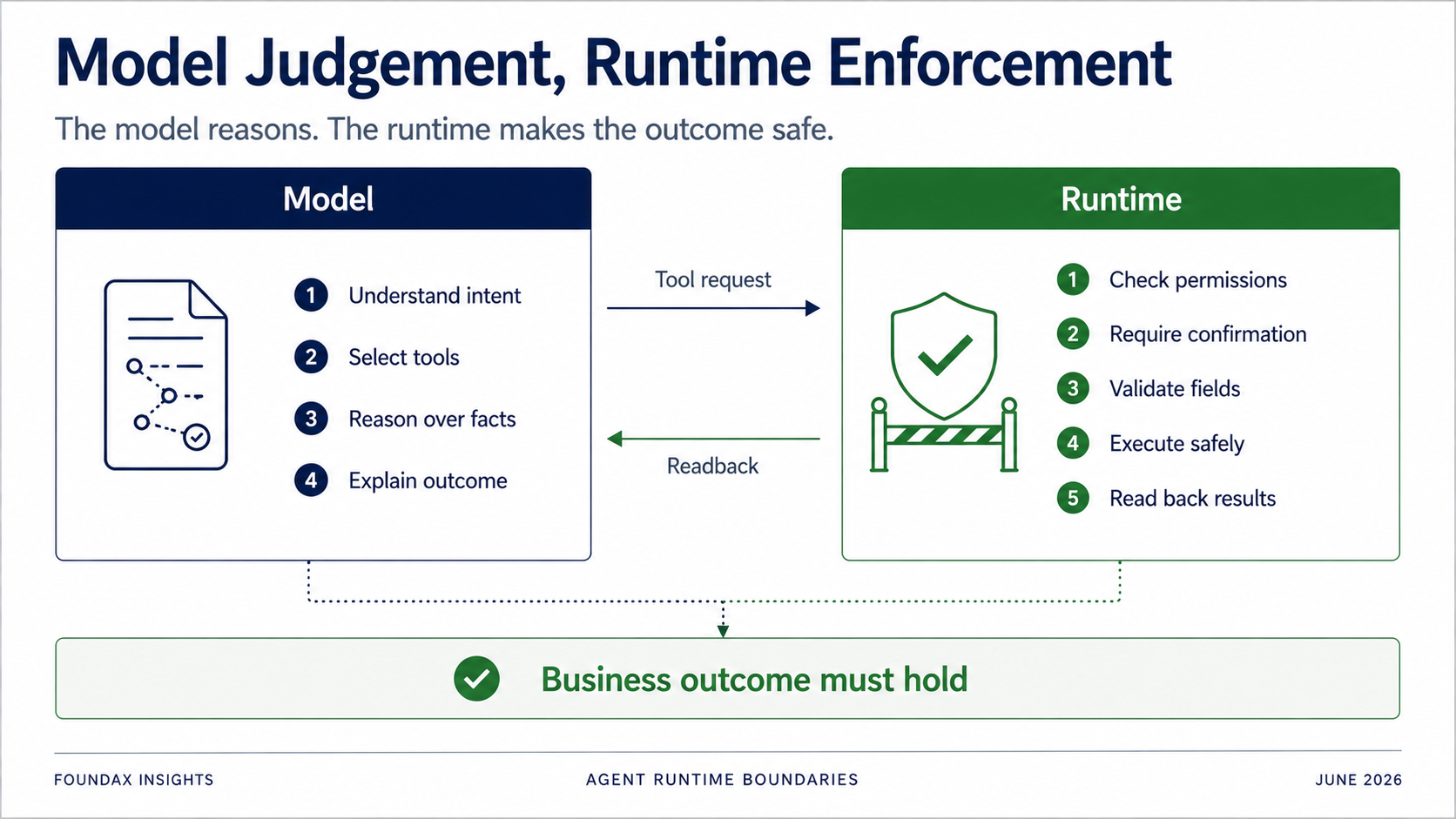
The model is responsible for understanding, judging, selecting, and explaining.
The runtime is responsible for permissions, confirmation, field validation, owner executor boundaries, actual execution, and readback.
Especially for write operations: you absolutely cannot rely on the model to voluntarily follow rules.
The model can say "I want to update this product's SEO."
But the runtime must determine: Does the current user have permission? Does this action require confirmation? Should it only generate a draft first? Is the field on the allowlist? Does the object belong to the current merchant? Did the write actually succeed? After readback, does the business state truly match the target?
The Agent's goal is not to prove a tool call succeeded. It's to prove the business outcome holds.
This boundary is essential. Not everything goes to the model, and not everything goes to the runtime. The real question is division of labor.
The biggest takeaway from this journey isn't that 4.0 is definitively the best architecture.
It's that building an Agent makes it dangerously easy to get carried along by a chain of real engineering concerns.
Worried that high-frequency tasks aren't stable when the model improvises every time? → Build fixed workflows.
Worried that context is too long and the model suffers attention dilution? → Build directory exploration.
Worried that tool count growth makes tokens explode? → Build runtime retrieval.
Worried that keyword-based retrieval is too brittle for multi-language and cross-domain tasks? → Consider embeddings, scoring, reranking.
Worried that the model picks tools without reading the full list, or outputs answers before facts are complete? → Add structured constraint fields.
None of these worries are imaginary. They all correspond to real problems.
We just found — the hard way — that many solutions solved one problem while introducing another.
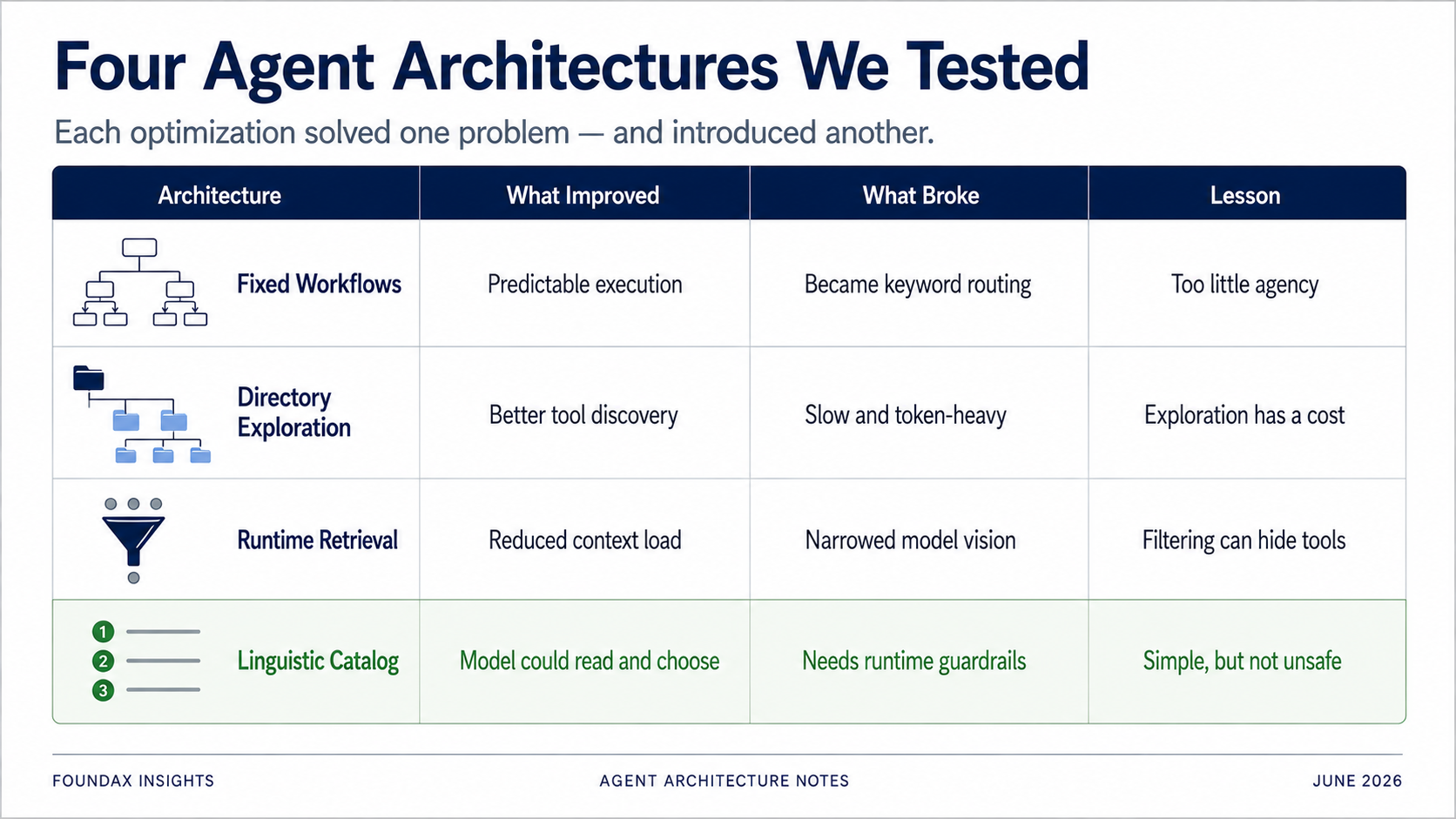
Fixed workflows added stability but capped model reasoning. Directory exploration was accurate but slow and token-heavy. Runtime retrieval saved context but could block tools the model needed. Embeddings looked smart but, for LLM-native tool selection, were probably a detour. Structured fields could constrain the model, but sometimes a natural language prompt worked better.
And the more critical realization:
These problems are real, but they aren't necessarily equally severe in your project.
Does long context actually cause attention dilution for your use case? Test it. Does your tool count actually make token costs unacceptable? Test it. Does full tool exposure actually make your model lazy, path-dependent, or error-prone? Test it. Does runtime retrieval actually block tools your model needs? Test it too.
The easiest mistake in Agent architecture is treating "problems that genuinely exist in someone else's project" as "problems that definitely exist in yours."
So the first step of building an Agent isn't designing a complex architecture to preempt every possible problem. It's testing:
What can the model actually understand in your domain? Can it read your tool descriptions? Can it select tools on its own? Where does it miss facts? Which decisions can you hand to it? Which must the runtime enforce? Which actions require user confirmation? Which results must be readback?
The answers to these questions — not a reference architecture from a blog post — should determine your Agent's design.
For Foundax, we now have clarity: ecommerce operations are a domain the model knows well. Conversion funnels, product pages, pricing, shipping, promotions, payment, traffic quality, SEO — these analytical frameworks appear countless times in training data. The model doesn't lack business analysis instincts. What it lacks is knowledge of Foundax's specific system: what facts it can read, what writes it can prepare, which actions the runtime must own, which results must be readback.
So Foundax Agent isn't about teaching the model how to do ecommerce analysis. It's about handing the model Foundax's business capabilities in a language it can read.
The first step of building a business Agent is not designing a perfect architecture. It's testing how much you can actually trust the model.
We're not the only ones arriving at these conclusions.
In December 2024, Anthropic published their guide "Building Effective Agents". Its core message: simplicity wins. Start with the simplest possible solution. An augmented LLM with tool access may be all you need. When I read it at the time, I nodded. After living through what I've described above, I understand it viscerally.
Then in May 2026, LangChain held their Interrupt conference with a notable pivot: the theme shifted from 'can agents go to production' to 'enterprise scale and production operations.' The real bottleneck, as their materials emphasized, isn't writing agents — it's managing them in production at scale.
A growing body of research reinforces this direction. Google DeepMind's 2025 work on embedding limitations showed mathematically that fixed-size vector embeddings lose structural and relational information at scale — directly relevant for anyone considering embedding-based tool retrieval. Neo4j's concept of "context engineering" argues that reliable AI comes from architecture, not clever prompt phrasing.
Our experience aligns with a direction we're seeing across the industry: Anthropic's simple/composable patterns, LangChain's emphasis on production operations over framework abstractions. Less pre-built scaffolding, more direct model capability — but always validated against real usage, not adopted as doctrine. Less pre-filtering, more model judgment. The question isn't "how do we build a perfect architecture around the model?" It's "how do we give the model what it actually needs and get out of its way?"
This doesn't make Foundax's conclusions universal. Different businesses, different models, different tool surfaces will arrive at different answers. What's universal is the method: test first, design second.
Q: Does this mean I should always expose all tools to the model?
No. It depends on your tool count, your model, your context budget, and your domain. The point isn't "always expose everything." The point is: test before you filter. Don't assume the model can't handle it — verify. In our case, a dozen or so compressed tool signatures per task was manageable and effective. Your numbers may differ.
Q: When should I use fixed workflows instead?
When the task is genuinely deterministic, the risk of error is catastrophic, and the model's background knowledge in that domain is weak. Workflows aren't wrong — they're wrong when they replace reasoning the model could have done. Use them for safety guardrails and deterministic post-processing, not as a substitute for model judgment.
Q: What's the difference between a linguistic catalog and an API schema?
A linguistic catalog tells the model what a tool can do, in compressed natural language — e.g., "Read: [12] Product Variants — SKU / price / inventory / availability status." An API schema tells the model how to call the tool, with full parameter specs, enums, and constraints. The model needs the capabilities menu. The runtime needs the technical manual. Mixing these two is one of the most expensive mistakes you can make.
Q: How do you decide what goes to the model vs. the runtime?
A good heuristic: the model handles understanding, judgment, selection, and explanation. The runtime handles permission, execution, confirmation, validation, and readback. If you're asking the model to enforce rules, you're on the wrong side of the line. The model suggests; the runtime decides and executes.
Q: What about cost? Doesn't exposing more tools increase token usage?
In our case, a compressed linguistic catalog was actually cheaper than multi-round directory exploration or retrieval chains. Each tool entry is around a thousand-odd characters. With a dozen or so tools exposed per task, the total is about ten to twenty thousand-odd characters — roughly four to five thousand tokens. Compare that to multiple rounds of intent decomposition, retrieval, candidate review, and re-selection. The simpler approach was often more token-efficient, not less.
Q: What was the single most important insight from this process?
That "helping the model" and "constraining the model" can look identical from the designer's perspective, but have opposite effects on the system. Every architecture we built was intended to help. Most of them ended up constraining. The difference only became clear through testing. If you take one thing from this article, let it be this: test what your model can actually do before you start designing architecture to compensate for what you assume it can't.