DTC Sites vs Marketplaces in Agentic Commerce
Agentic commerce gives marketplaces new distribution power, but DTC sites remain the place where brands control product facts, trust, customer data, and measurement.
Read more
Google, Microsoft, and GitHub have already brought AI coding into real software workflows. But developers remain cautious about accuracy, missing context, and long-term maintainability. This article explains why real AI-assisted development should start with project picture, then move into tech stack choices, code structure, task execution, skills, impact analysis, and regression checks. It also shows how Foundax applies the same principle to merchant AI workflows.
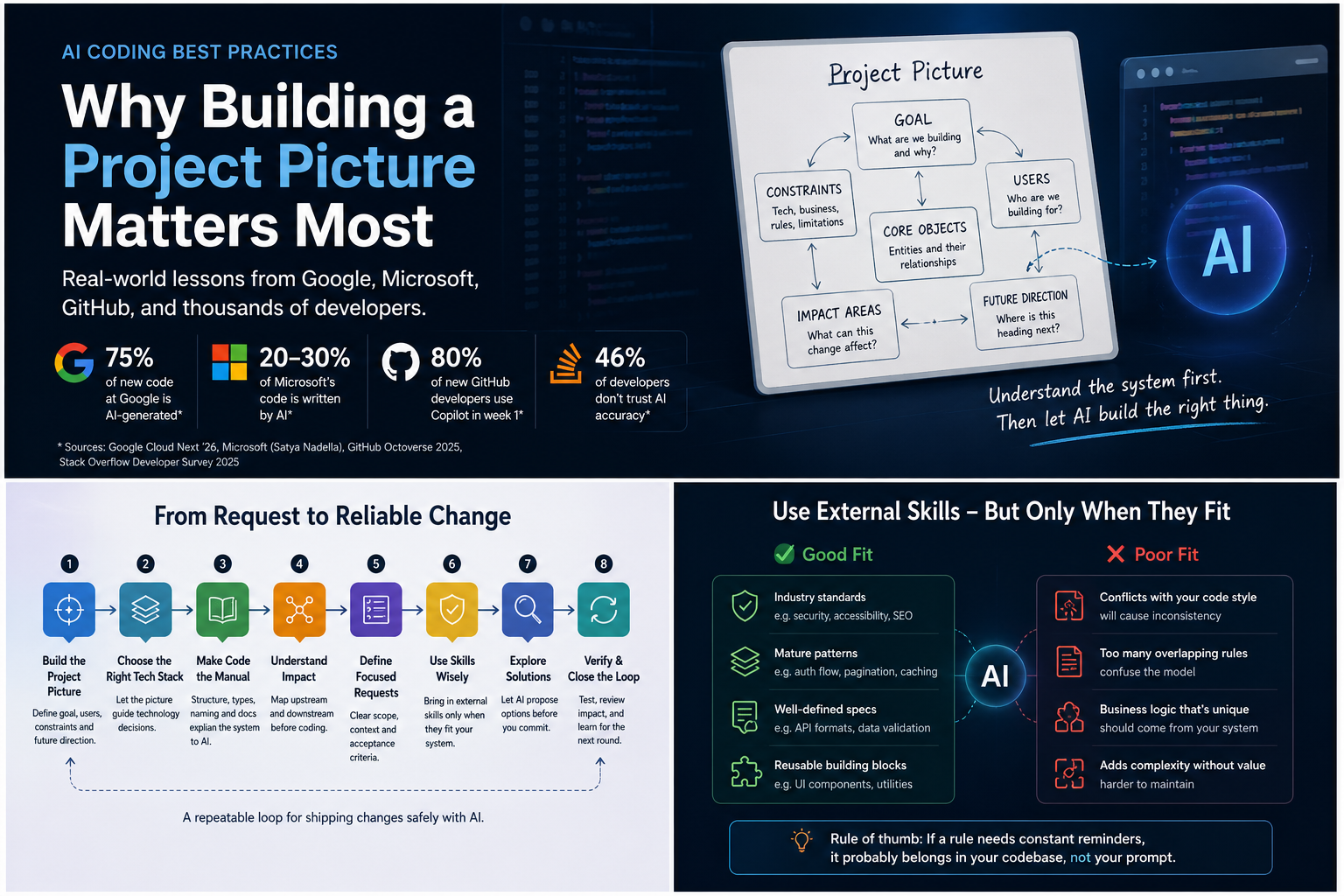
AI coding has moved past the question of whether AI can write code.
Not long ago, most conversations around AI coding were still about demos: Can it generate a page? Can it write a function? Can it fix a bug? That question is no longer the most interesting one.
In 2026, Google CEO Sundar Pichai said that 75% of Google’s new code is now generated by AI and reviewed by engineers. Microsoft CEO Satya Nadella has also said that roughly 20%–30% of code in Microsoft repositories is generated by AI. GitHub Octoverse 2025 shows how quickly new developers are entering AI-assisted workflows: 80% of new GitHub developers use Copilot within their first week.
The trend is already clear: AI coding is entering real software development.
But another reality is just as clear: developers do not fully trust it yet.
The Stack Overflow Developer Survey 2025 found that 46% of developers distrust the accuracy of AI tools, compared with 33% who trust it. METR’s 2025 randomized controlled trial with experienced open-source developers found that, in mature codebases, using then-current AI tools actually increased task completion time by 19%. DORA’s 2025 report on AI-assisted software development also frames AI as an amplifier: it amplifies the strengths an organization already has, and it can also amplify existing problems.
That creates a very real tension.
Big tech is using AI coding. Developers are using it too. But people responsible for real systems still do not simply trust an “AI says it is done” message.
The reason is easy to understand.
AI can quickly produce a feature that looks correct in isolation. The page opens. The button works. The API responds. The UI looks fine. But once the change is merged back into a real product, another module breaks, an old path gets bypassed, component conventions become inconsistent, language fallback disappears, SEO metadata gets overwritten, or an edge case nobody mentioned stops working.
That feeling is familiar: the change looks fine by itself, but something feels wrong once it sits inside the full system.
So the real question is not whether AI can write code.
The more important question is:
Is AI completing a task, or does it understand the system?
If it only understands the task, it can be locally correct and systemically wrong. If it understands the system first, AI coding has a much better chance of becoming real productivity.
---
When a team first starts using AI coding, the natural move is to throw tasks at it.
“Add a filter here.” “Update this page.” “Refactor this component.” “Connect a payment entry point.” “Add a multilingual field.”
AI usually responds quickly. The problem is that it may only be completing the literal task.
You ask it to add a filter, and it adds a filter. You ask it to update a page, and it updates the page. You ask it to refactor a component, and it refactors the component.
But it may not know why that page exists, where the component is reused, whether the field is consumed by the storefront, or whether the payment entry point is tied to order states, callbacks, refunds, and error handling.
That is why project picture matters.
Project picture is not a line like “this is a SaaS product” or “this is an ecommerce website”.
That is background, not system understanding.
A useful project picture should answer at least five questions.
First, the goal.
What is this product trying to achieve? Search traffic, conversion, product management, lead capture, transaction processing, or operational efficiency? The same “build a page” task means very different things depending on the goal. If the goal is SEO, the page needs metadata, structured content, internal links, and crawlability. If the goal is backend efficiency, it needs forms, filters, bulk actions, and error handling. If the goal is conversion, the page cannot only look good; it has to support trust, payment, orders, and after-sales expectations.
Second, the objects.
What are the core objects in the system, and how do they relate to each other? Words like user, product, order, page, content, and site can mean very different things across different systems. If the objects are unclear, AI can easily mix things that look similar technically but are different in the business.
Third, the constraints.
What should not be changed casually? Existing component libraries, routing patterns, i18n structure, permission models, publishing flows, payment flows, migration constraints, brand voice, and SEO strategy are all constraints. Constraints are not there to limit AI. They help AI avoid the wrong path.
Fourth, the impact surface.
When something changes, where can the impact travel? Does it only affect one page, or does it touch data models, APIs, storefront rendering, i18n, caching, search, permissions, or analytics? The clearer the impact surface, the less likely it is that “this feature works, but something else broke.”
Fifth, the future direction.
Is this a one-off patch, or will it become a product capability? If it will be reused, hard coding is risky. If it is a short-term fix, over-abstracting may be unnecessary.
These five questions together form the picture AI needs.
Without picture, AI treats the task as isolated. With picture, AI can judge the task inside the system.
Practical rule: project picture is not a project intro. It is the goal, objects, constraints, impact surface, and future direction. Without it, do not rush into asking AI to make major code changes.
---
Tech stack discussions often become arguments about what is more modern.
React or Vue? Next.js or Remix? Node.js or Go? PostgreSQL or MySQL? Should we use the newest framework everyone is talking about?
These questions matter, but they cannot be answered outside the project picture.
A content site, a transaction system, an internal admin tool, a B2B lead-generation platform, and an AI workflow platform do not need the same capabilities. What the product needs to support should decide the data model, routing structure, permission model, rendering strategy, SEO capability, payment ecosystem, component system, and deployment path.
In the AI coding era, the tech stack also has a new dimension:
Can AI understand it easily, and can humans verify it easily?
Models do not understand a codebase from nowhere. Their understanding of a stack depends on how much real code, open-source work, documentation, error discussion, and engineering practice exists in that ecosystem. The more reliable examples AI has seen, the less likely it is to guess from thin air.
That is why many web products, admin systems, content systems, and transaction-oriented products often prefer mature combinations such as TypeScript, React / Next.js, Node.js, PostgreSQL, mature payment ecosystems, and stable UI component systems.
This does not mean those technologies are always the best choice.
It means they are easier for AI to understand, and easier for humans to verify.
GitHub Octoverse 2025 shows that TypeScript has become the most-used language on GitHub. State of JavaScript 2024 also found that 67% of respondents write more TypeScript than JavaScript. This matters for AI coding because as AI writes more code, teams need stronger type systems, IDE feedback, static checks, and consistent engineering patterns to constrain the output.
TypeScript is not only about type safety.
In AI coding, it also gives the model structural signals:
What parameters a function expects. What props a component receives. Whether an object is missing a field. Whether an API response matches the expected shape. Whether the change still passes typecheck.
Mature frameworks, payment ecosystems, databases, and UI systems play a similar role. They reduce the space for AI to improvise and help both humans and models follow stable patterns.
Of course, a mature stack is not always the answer.
If the project picture involves high-concurrency infrastructure, real-time video, edge networking, or deep data processing, the tech stack needs to be judged differently. AI-friendliness is not the only standard. Business fit still comes first.
Practical rule: use project picture to decide what the business needs, then use AI-friendliness to judge whether the stack is easy to understand, verify, and maintain. A good AI coding stack is business-fit, widely seen by models, human-verifiable, type-constrained, and supported by strong community patterns.
If you are evaluating an ecommerce stack or site builder, you may also want to read this case study: Platform "Hidden Taxes" and the True Cost of a Bloated Tech Stack.
---
As a project grows, the hardest part of AI coding is not always that there is too much code. It is often that the code is too noisy.
A common scene looks like this: you ask AI to change a feature. It reads many files and clearly tries hard, but it still creates a parallel implementation.
It ignores the existing component and writes a new one. It skips the existing API and creates another path. It does not reuse the existing type and defines a similar one. It bypasses the i18n structure and hard codes text. It does not remove old logic; it simply adds another compatibility layer.
At that point, do not rush to blame the model.
Look back at the project itself. The problem may already be there: three different fallback paths, i18n mixed with hard-coded text, “shared” components with business logic inside, old implementations that are no longer used but never deleted. AI enters that environment and chooses one of the conflicting signals that seems reasonable to it.
This explains why the same instruction has to be repeated again and again.
“Do not create a new component.” “Do not hard code.” “This page must use i18n.” “This button should use the existing component.” “This API should use the shared error handling pattern.”
If these rules have to be repeated in prompts every time, the issue is not simply that AI forgot. It is that the project structure does not express the rules clearly enough.
Prompt reminders are fine in the short term.
But over time, the better move is to ask the opposite question: does the code already contain conflicting fallbacks? Is i18n inconsistent? Is the component library boundary unclear? Does the same business object have multiple names? Are old implementations still there, making it impossible for AI to know what the current standard is?
The real solution is not a longer prompt. It is making the rules part of the codebase.
Folder structure tells AI module boundaries. Types tell AI data relationships. Adapters tell AI transformation rules. Schemas tell AI input and output constraints. Tests tell AI key behaviors. Naming tells AI business language. Docs tell AI design intent.
At that point, the code itself becomes documentation.
When AI builds features, refactors, or investigates issues, it does not need a human to re-explain everything from scratch. It can follow the structure, find relevant modules, understand the impact surface, identify duplicate implementations, and reduce the risk that one task breaks another part of the product.
Practical rule: whenever you need to repeat the same rule to AI, first check whether the codebase already contains conflicting signals. Then move the rule into structure, types, naming, schemas, adapters, tests, or documentation. Otherwise, you are using prompts to maintain system consistency.
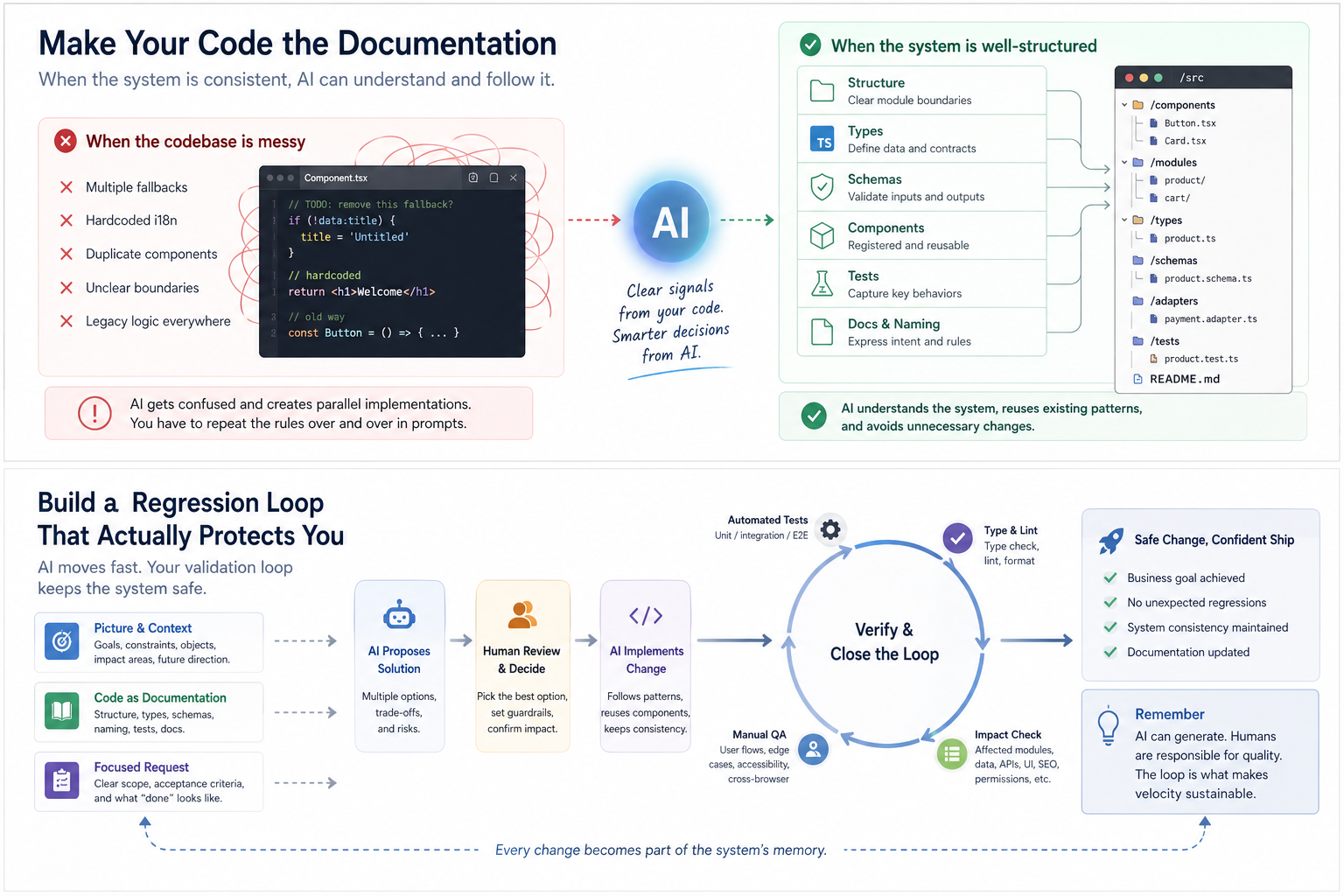
The most dangerous part of single-task AI work is not that AI cannot write the code. It is that AI only sees what is in front of it.
The page renders, but SEO breaks. The form submits, but permissions are bypassed. The payment entry opens, but order state is incomplete. The multilingual field saves, but the storefront runtime does not consume it correctly. The component looks better, but no longer fits the existing design system.
These are not syntax errors.
They are impact-surface errors.
The painful part is that they often do not show up immediately. The page looks fine today. The build passes. The AI summary sounds confident. A few days later, another language version has the wrong title, an old link returns 404, a form submission never reaches the admin panel, or a seemingly unrelated publishing flow starts failing.
You cannot solve this just by writing the task in more detail.
The problem is not that AI does not know what you want this time. The problem is that it does not know what this change may touch.
When the project has a picture, and the codebase gradually becomes documentation, AI can do more than edit a file. It can start following the system structure to understand upstream and downstream dependencies.
If you ask it to change a content module, it can trace types, adapters, page consumers, SEO metadata, i18n keys, and storefront rendering paths.
If you ask it to change a form, it can trace schemas, APIs, validation, submission logic, notifications, lead records, and front-end interactions.
If you ask it to adjust a component, it can trace component registration, reused pages, theme tokens, responsive behavior, and accessibility checks.
That is the value of code as documentation.
Without picture, AI can only answer “how do I implement this?” With picture, AI can also answer “what could this affect?”
Practical rule: before asking AI to implement a task, do not only ask how it will do it. Ask it to trace the modules, paths, and regression points that may be affected.
---
Tasks should be clear.
But clarity does not mean describing every button, field, color, and interaction in extreme detail.
Some AI coding tasks look smooth at first: you write the requirement carefully, and AI follows it. But when it finishes, the system state feels stranger. Old logic remains, new logic gets layered on top, the page works but reuse is broken, a field gets added but the source and destination of the data are incomplete.
That experience can be misleading. It makes you wonder whether the requirement was not detailed enough.
Often, the missing part is not detail. It is the target system state.
You tell AI “add a button,” and it adds a button. You tell AI “add a field,” and it adds a field. You tell AI “make this a two-step confirmation,” and it changes the flow.
But you did not tell it what the system should have less of, what should remain, and what should be unified after the change.
After adding new logic, should the old logic be deleted? After adding a new field, how should historical data be handled? After launching a new page, should the old entry still exist? After adding a new component, should duplicate components be consolidated? After introducing a new i18n approach, should old hard-coded text be removed too?
This is the part that is easiest to miss in a single task.
A good requirement should not only tell AI what to build. It should also include three things.
First, why the task exists.
Is it for user experience, conversion, operational efficiency, SEO, stability, or technical debt? If the goal is unclear, AI will usually choose the most direct path, not necessarily the best path.
Second, what the system should look like after the change.
What should change? What should not change? Which old logic should be removed? Which compatibility logic should stay?
Third, how to tell whether it did not break anything.
Which pages should be checked? Which paths should be run? Which data should be inspected? Which fallback behavior should be confirmed? Without acceptance criteria, AI can easily produce something that merely looks done.
So yes, a task can be detailed.
But it cannot only contain details. It also needs to tell AI what state the system should be in after the change.
Practical rule: local task details are useful, but they must be paired with why the task exists, what the target system state is, and how to verify that nothing was broken.
---
As AI coding tools become more popular, the internet naturally fills up with rules, skills, prompts, and best practices.
That is understandable. Everyone wants to make AI more reliable.
But a common problem is that teams add a stack of external rules before the project picture is clear or the code structure is clean.
Front-end development skills. UI design skills. React best practices. SaaS architecture rules. SEO writing prompts. Security checklists. Code review rules. “God-mode” configurations for Cursor, Claude Code, or Codex.
These are not useless.
The problem is that they are not the same kind of rule.
The first kind is external baseline rules.
Security checks, SQL injection risks, XSS risks, permission checks, payment idempotency, API error handling, accessibility basics, SEO basics, performance checks, and test coverage reminders fall into this category.
These rules are relatively universal. They usually conflict less with project style, and many of them are baseline safeguards. External skills, checklists, and best practices can be valuable here.
The second kind is project-native rules.
Page style, component usage, theme tokens, spacing habits, form components, modal behavior, routing structure, i18n organization, business layering, data naming, folder conventions, and component reuse boundaries all belong here.
These rules should not be copied from the internet first.
Their most important source is not how someone else does it. It is how your project already works.
Front-end page generation is a good example.
You want the page to look better, so you add external front-end skills: modern SaaS style, premium feel, glassmorphism, card layout, motion, strong visual hierarchy, landing page best practices.
Each of these may be reasonable on its own.
But if the project already has its own component library, Tailwind tokens, buttons, cards, forms, responsive rules, brand style, and page structure, those external skills may create interference instead of improvement.
AI starts to hesitate:
Should it follow the external skill or the existing components? Should it reuse the existing Card or create a new card design? Should it add motion for a premium feel or preserve performance and consistency? Should it use the external landing page layout or follow the product’s own information architecture?
The final result may look more “standard” in one place, but less consistent as a whole.
It is not that AI failed to follow the rules. It followed too many rules that did not belong to this project.
At that point, instead of adding more rules, ask AI to summarize the project’s real rules.
Which components are commonly used? How are pages usually structured? Are forms, modals, buttons, and cards written in a consistent way? Where do i18n keys usually live? What are the conventions for API calls and error handling? Which components should be reused, and which logic should not be duplicated? How were similar features implemented recently? What implicit but stable engineering habits does the project already have?
Summarize these first. Then decide which external skills are worth adopting and which do not fit the current project.
Practical rule: external skills are useful for baseline rules such as security, compliance, performance, accessibility, and SEO. For component style, business layering, page structure, and naming conventions, let the model summarize your codebase first.
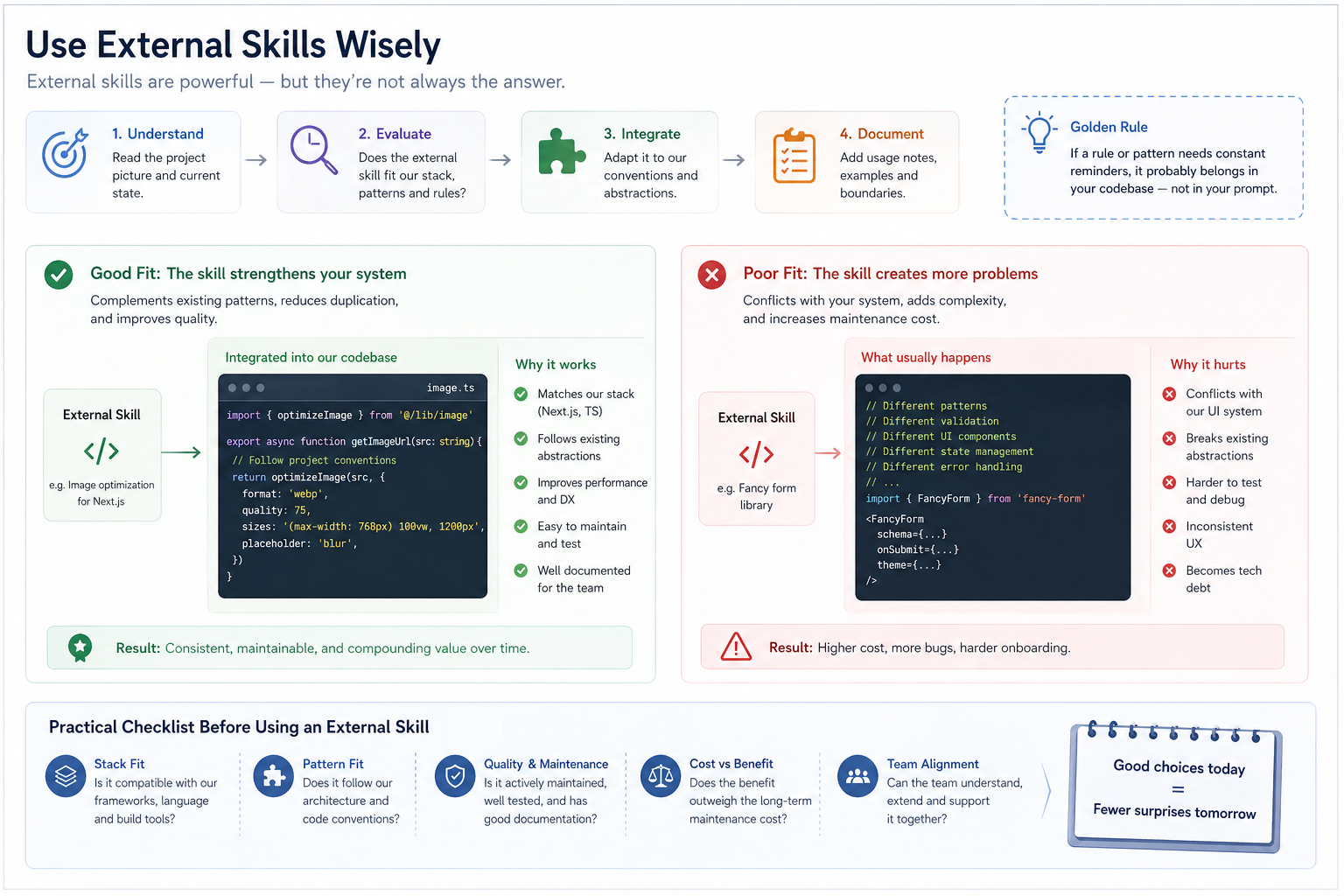
One of the weakest ways to use AI coding is to treat it as an obedient executor.
You decide the solution, then ask AI to implement it. It does implement it. But afterward, you realize the path was wrong from the beginning.
This happens often: you ask AI to fix an issue, and it fixes it with a heavy solution. You ask it to add a feature, and it adds it, even though reusing an existing module would have been better. You ask it to refactor a logic block, and it does, but misses that the real issue is the data structure.
What makes a large language model different from a traditional automation tool is that it does not only execute instructions. It can write code because it has absorbed a large amount of real-world software patterns, open-source projects, engineering discussions, failure cases, and best practices.
It knows how CMS systems usually organize content. It knows why ecommerce systems care about order states. It knows why i18n should not be hard-coded everywhere. It knows why payment callbacks need idempotency. It knows why storefront runtime and admin editor need a stable contract. It also knows why SEO, structured data, forms, permissions, logs, and tests affect each other in real systems.
If you only use it to turn your idea into code, you are leaving a lot of value unused.
A better approach is to let AI explore options based on the project picture and code context first:
Is there a more mature implementation pattern? Which layer should this feature belong to? Is there an existing pattern we should reuse? What modules could this change affect? Is there duplicate logic in the current code? Should any old logic be removed? Is this requirement even the right solution to the problem?
This is not asking AI to make the final decision.
It is asking AI to widen the decision space.
AI can propose conservative fixes, local refactors, protocol abstractions, reuse of existing components, deletion of old logic, splitting into a separate module, or even point out that the current requirement may not be the right one.
The final choice still belongs to the human.
Because many real product decisions are not purely technical. Early-stage products may care more about speed. Transaction flows may care more about stability. SEO pages may care more about structure and crawlability. Internal tools may care more about maintainability. Customer-facing pages may care more about trust and consistency.
AI can show you options. It cannot take responsibility for the trade-off.
Practical rule: when the implementation path is unclear, ask AI for 2–3 options, assumptions, impact surfaces, and risks first. When the boundary is clear, then break the task down and let it execute.
---
AI is very good at creating a feeling of completion.
The code is written. The explanation is written. The summary is written. The testing suggestions are written. Even the delivery note sounds professional.
But real projects cannot rely on “done”.
A more realistic experience looks like this: the summary sounds reassuring, but the diff shows that AI touched a few files it should not have touched. The current page works, but another entry breaks. You thought it only changed copy, but metadata, fallback logic, and component references were changed along the way.
That is why verification cannot be an afterthought.
The faster AI generates, the more important the regression loop becomes. Once generation becomes cheap, the scarce part is no longer producing code. It is proving that the code did not break the system.
A good regression loop starts before the change.
First, ask AI to identify the impact surface.
Which modules, pages, APIs, types, data, SEO, i18n, permissions, payments, forms, caching, or publishing flows might be affected?
Second, during implementation, ask AI to follow existing structure.
Reuse what should be reused. Follow existing patterns where possible. Do not create a parallel implementation casually. Do not break system conventions just to complete a local task.
Third, after implementation, ask AI to reverse-check regression points.
Which pages should be checked? Which paths should be run? Which tests may fail? Which types need validation? Which old logic should be removed? Which fallback behavior needs confirmation?
Fourth, humans and CI must verify the result.
Do not only read the AI summary. Read the diff. Do not only check the page. Run the flow. Do not only test the happy path. Test the exception path. Do not only check the default language. Check fallback behavior. Do not only verify that a payment or subscription was created. Check callbacks, cancellation, upgrade, downgrade, and duplicate triggers. Do not only check whether generated content reads smoothly. Check whether it fits the brand, page goal, and SEO structure.
This is also why big tech can bring AI coding into development workflows. Not because AI never makes mistakes, but because they have code review, testing, CI/CD, monitoring, permissions, logs, rollback, and engineering governance that can absorb the efficiency shift.
Practical rule: AI generates the result. Humans and CI prove that the result did not break the system. What to prove, and how to prove it, should come from project picture, code structure, and impact analysis.
---
If we start with “AI is an execution multiplier, not the steering wheel,” it sounds correct but a little empty.
In real projects, the division of labor is more specific.
AI is good at:
Proposing options based on world knowledge. Tracing impact through code structure. Finding duplicate implementations and potential conflicts. Generating first drafts of code, tests, and documentation. Explaining complex modules. Helping with refactors and migrations. Listing regression checks before release.
Humans are better at:
Judging business goals. Confirming project picture. Making technical trade-offs. Deciding whether a refactor is worth it at the current stage. Accepting or rejecting risk. Deciding which capabilities should become productized. Owning final quality and user experience.
This is not about who replaces whom.
AI expands judgment; humans make trade-offs. AI increases execution speed; humans own system direction. AI exposes more possibilities; humans choose which path to take.
Practical rule: do not use AI only as an executor, and do not let AI own direction. Let AI expand options and impact analysis; let humans own stage judgment, business trade-offs, and final quality.
---
The logic behind AI coding naturally extends into merchant AI workflows.
Both face the same underlying problem:
AI needs to understand context before it can execute useful tasks.
AI needs project picture to write code well. AI needs merchant picture to generate useful content. AI needs brand, product, page, and conversion structure to support SEO and GEO.
That is why many merchants use AI to write copy, build pages, generate FAQ, or draft articles, and the result looks complete but does not convert.
The problem is usually not that AI cannot write.
The problem is that AI does not know:
Who the merchant is. What they sell. Who they sell to. Why customers should trust them. What job the page is supposed to do. Whether the content should drive inquiry, purchase, or long-term search traffic. Which real concerns the FAQ should answer. How products, pages, forms, and SEO connect.
Without that context, AI can easily generate content that looks like copy.
It may be smooth, complete, and even polished. But it lacks business judgment.
So the key to merchant AI workflows is not asking users to write more prompts.
The more important question is whether the system can automatically organize brand, product, page goal, FAQ, form, SEO, and conversion path data into higher-quality context — so that AI understands the merchant and the business before executing the task.
This is the direction Foundax focuses on when designing AI workflows.
We do not see AI as an isolated “generate” button. A more valuable approach is to bring AI into the merchant’s operating flow: helping merchants organize content, pages, multilingual assets, SEO, and marketing materials faster, while the system carries products, forms, payments, orders, publishing, and conversion paths.
In this design, AI is not simply “writing a paragraph for you”.
It should first understand:
What the brand stands for. What problem the product or service solves. What job the page needs to do. What concern the FAQ should answer. What kind of lead the form should collect. What search intent the content should serve. Whether the page should drive inquiry, purchase, or long-term trust.
Then it can generate something useful.
This is the same logic as AI coding.
Do not give AI only a local task. Let it understand the picture first. Then use structured data, business contracts, and context injection to place it in the right information environment.
Practical rule: the key to merchant AI workflows is not a better prompt. It is structured data, business contracts, and high-quality context that help the model understand the brand and business before generating copy, pages, multilingual content, SEO assets, or operational materials.
---
Traditional SEO has often focused on keywords, titles, descriptions, and backlinks.
Those still matter.
But as AI search and generative answers become more common, a deeper question becomes more important:
Can machines understand who you are?
Are you a brand website or a temporary landing page? What do you sell? Who do you serve? Where are your products, services, cases, FAQ, and contact points? Is there structure between your content? Can your pages be crawled, understood, and cited?
This is the same underlying issue as AI coding.
AI coding requires the model to understand project structure. AI content generation requires the model to understand merchant structure. SEO requires search engines to understand page structure. GEO requires generative search systems to understand the relationship between brand, products, services, and content.
So the future will not only be about who can generate more content.
The easier content becomes to generate, the more important structure becomes.
If a brand only generates a large number of isolated pages, search engines and AI search still see fragments. If a brand organizes its website, products, services, cases, FAQ, content, forms, conversion paths, and multilingual pages into a clear structure, it becomes easier for users, search engines, and AI systems to understand.
Practical rule: SEO and GEO are not only content production problems. They are structure problems. The clearer you organize brand, product, content, FAQ, and conversion paths, the easier it is for both machines and users to understand you.
If you are building SEO and GEO for a storefront, you may also want to read: The New Rules of SEO: Winning the AI Search (GEO) Game in 2026, How to Get Products Shown in ChatGPT and Google AI Mode: A 2026 Merchant Playbook.
If you care about how brand assets, content, and SEO work together, also read: Why 2026 Is the Right Time to Build Your Personal Brand Assets.
If you are evaluating AI coding tools or tech stack choices, read the companion article: How Should Multi-Market DTC Brands Choose an Ecommerce Stack in 2026?.
If you want the product-strategy angle on why web-first delivery matters more in the AI era, read: Will AI Push More Products Back to the Web in 2026?.
If you are building SEO and GEO for a storefront, continue reading: The New Rules of SEO: Winning the AI Search (GEO) Game in 2026, How to Get Products Shown in ChatGPT and Google AI Mode.
If you want to see how Foundax brings AI workflows into merchant operations, review features.
Not code. Not skills. Project picture.
At minimum, AI should understand five things: goal, objects, constraints, impact surface, and future direction. Otherwise, it will treat requirements as isolated tasks and may produce locally correct but systemically wrong results.
Decision rule: if AI cannot explain why the project exists, what the core objects are, and what constraints must not be broken, do not ask it to make major code changes yet.
---
Start with business picture, then evaluate AI-friendliness.
If the product involves content, pages, SEO, admin operations, transactions, forms, payments, and multilingual support, it usually needs mature frameworks, clear types, stable databases, mature payment ecosystems, and verifiable engineering workflows.
An AI-friendly stack is not the newest stack. It is a stack that models have seen often, humans can verify, types can constrain, and the community has strong patterns for.
Decision rule: do not only ask whether the technology is new. Ask whether it fits the business, whether AI can understand it, whether the team can verify it, and whether long-term maintenance is manageable.
---
Yes, if the project becomes noisier.
But if the project becomes more structured, AI may actually become easier to use. Folders, types, schemas, adapters, tests, naming, and documentation can gradually become the model’s operating manual.
The real issue is not project size. It is context noise.
Decision rule: as the project grows, reduce context noise before increasing AI automation.
---
Not necessarily.
Detailed requirements can improve single-task accuracy, but they do not guarantee system correctness. A better requirement should not only say what to do. It should also explain why the task exists, what the target system state is, and how to verify that nothing was broken.
Decision rule: local task details are useful, but they must be paired with goal, system state, and acceptance criteria.
---
Not at the beginning.
Rules, skills, and best practices are useful, but they need to be separated by type. External skills are useful for baseline rules such as security, compliance, performance, accessibility, and SEO. But project-native rules such as component style, business layering, page structure, and naming conventions should first be summarized from the codebase.
Decision rule: use external skills for universal baseline risks. Use the codebase itself to derive project style and business structure.
---
Ask AI to identify the impact surface before execution, implement along existing structure, reverse-check regression points after execution, and then let humans and CI verify the result.
Regression is not just a final testing problem. It is a workflow problem built on project picture, code documentation, and impact analysis.
Decision rule: before every change, ask what it may affect. After every change, ask what it may have broken.
---
Because “big tech uses AI coding” and “AI-generated code can ship without review” are two different things.
Google said 75% of new code is AI-generated, but it is still reviewed by engineers. Microsoft’s 20%–30% figure also does not mean code review, testing, and quality governance disappear.
The Stack Overflow Developer Survey 2025 shows that developer trust in AI output accuracy remains limited. METR’s study also shows that in mature codebases, AI tools may slow developers down due to understanding, waiting, checking, and correction costs.
Decision rule: AI coding is worth bringing into real workflows, but it must come with review, testing, validation, and rollback mechanisms.
---
Both are context problems.
AI needs project picture to write code. AI needs merchant picture to write copy, build pages, generate FAQ, and support SEO.
If the system cannot organize brand, product, page goals, FAQ, forms, SEO, and conversion paths, AI can only generate content that looks complete but lacks business judgment.
Decision rule: the key to merchant AI workflows is not more prompts. It is higher-quality structured context.
---
AI coding is already inside real development workflows.
But that does not mean software can be generated casually, or that product judgment can be handed to a model.
In real projects, AI’s value is not replacing judgment. It is expanding judgment.
But that only works if AI understands the system first.
So the right sequence is not asking AI to write more code.
It is:
Build the project picture. Choose a stack that fits the business and supports AI collaboration. Turn code structure into documentation. Let AI understand upstream, downstream, and impact through that structure. Then handle specific tasks, choose skills carefully, and build a regression loop. Finally, humans own trade-offs and final quality.
This logic applies to software development. It also applies to merchants using AI to write copy, build pages, support multilingual content, and improve SEO. It also applies to GEO and long-term brand asset building.
The next phase of AI coding is not getting AI to write more.
It is getting AI to work inside the right system.
---