Structuring Your Ecommerce Operations: Where Automation Actually Fits
Running a solo store means prioritizing where you spend your time. This framework breaks down everyday ecommerce operations, helping you decide which workflows to automate, where to use AI, and what to keep doing yourself.
Managing a small ecommerce business often feels like running on a treadmill that never slows down. Between routing orders, updating inventory, drafting product descriptions, and fielding customer inquiries, the daily routine is dictated by whatever alert flashes first.
For solo ecommerce operations and lean teams, the temptation is to look toward AI and automation as a total replacement for this daily grind. However, handing over the keys to customer communication, financial transactions, or inventory purchasing to an autonomous system is a fast track to costly errors. The actual job of ecommerce operations management is not to automate everything, but to turn reactive, invisible habits into observable workflows—and to know exactly where a machine can help, and where a human must decide.
Understanding the Tool Types
Before structuring an ecommerce workflow, it is necessary to separate the available tools by how they function. Treating a generative AI model like a deterministic rule, or expecting a simple rule to handle complex customer nuance, leads to broken processes.
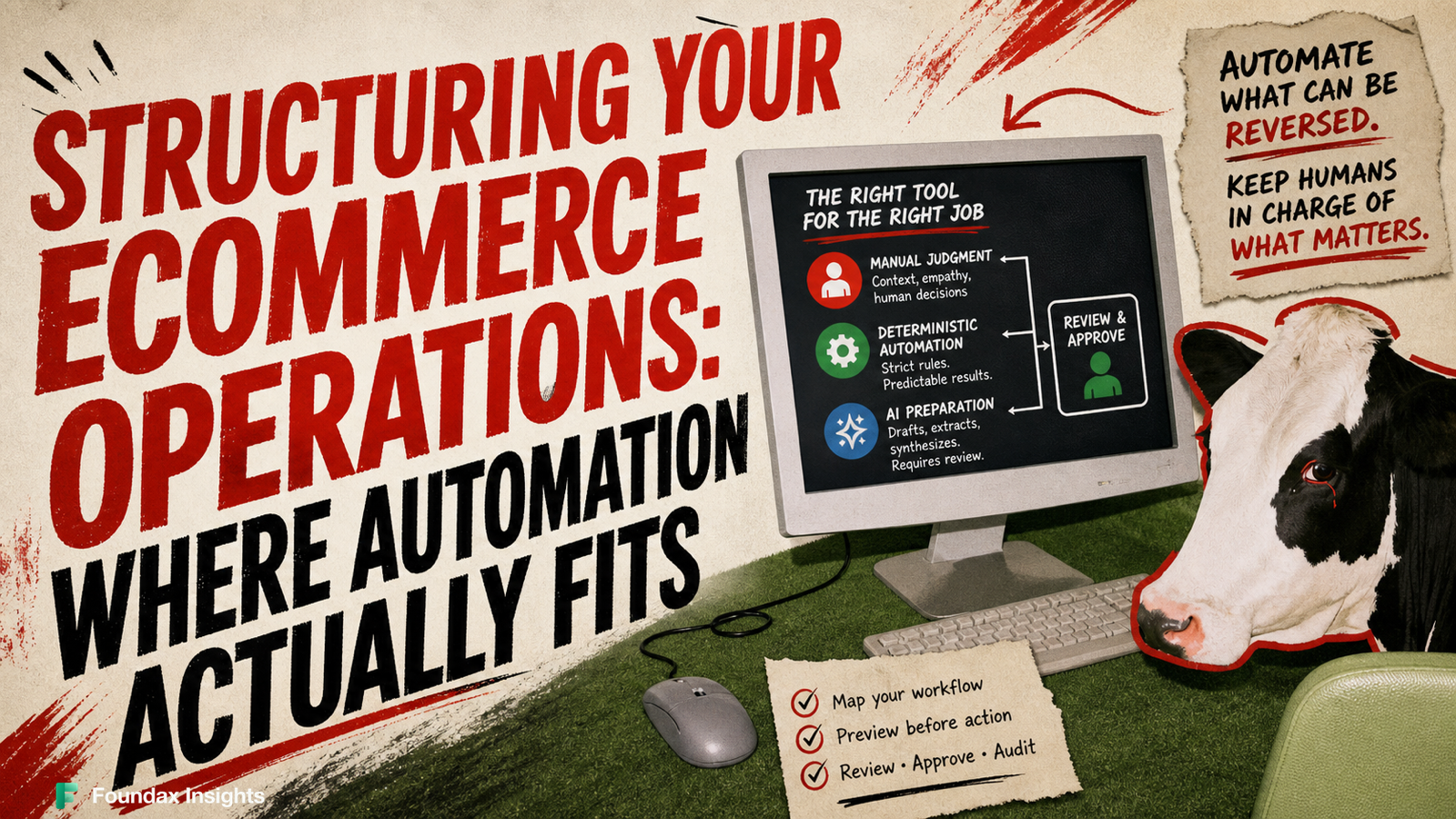
Manual Judgment: Work requiring context, empathy, or physical intervention. This includes approving refunds, selecting new suppliers, or handling a sensitive customer complaint.
Deterministic Automation: Strict "if this, then that" rules. These systems execute the same way every time. They are ideal for tagging, routing, and internal alerting because they do not guess or improvise.
AI Preparation: Generative tools used to synthesize data, extract text, or draft content. These tools are highly capable at preparing work, but they lack an understanding of truth, making them unsuitable for unsupervised final actions.
The Reversibility Rule
The safest way to evaluate any ecommerce workflow is by checking its reversibility. If an action executes incorrectly, you must know exactly how difficult it is to undo and who will notice the error. Tasks that directly impact money, inventory commitment, live publishing, and direct customer interactions are highly irreversible. Handing an autonomous system the authority to issue refunds, execute purchase orders, or decide on customer exceptions introduces unacceptable business risk. These high-impact actions always require a clear escalation path, a manual fallback, and explicit human approval.
Conversely, internal actions have high reversibility. If a deterministic rule incorrectly applies an internal tag, routes an order to a review queue, triggers an internal alert, or generates an unshown draft, the customer never sees it and no capital is lost. These internal, highly observable tasks are the appropriate starting points for automation, allowing you to test conditions and fall back to manual processes without public consequences.
Foundax offers visual editing and preview for product, site-page, and blog SEO information. Important SEO fields can be sourced from product facts as a single source of truth, helping reduce the risk that promotion, price, or inventory changes leave SEO information stale. Before making any publication decision, an operator must review the preview and verify the source facts.
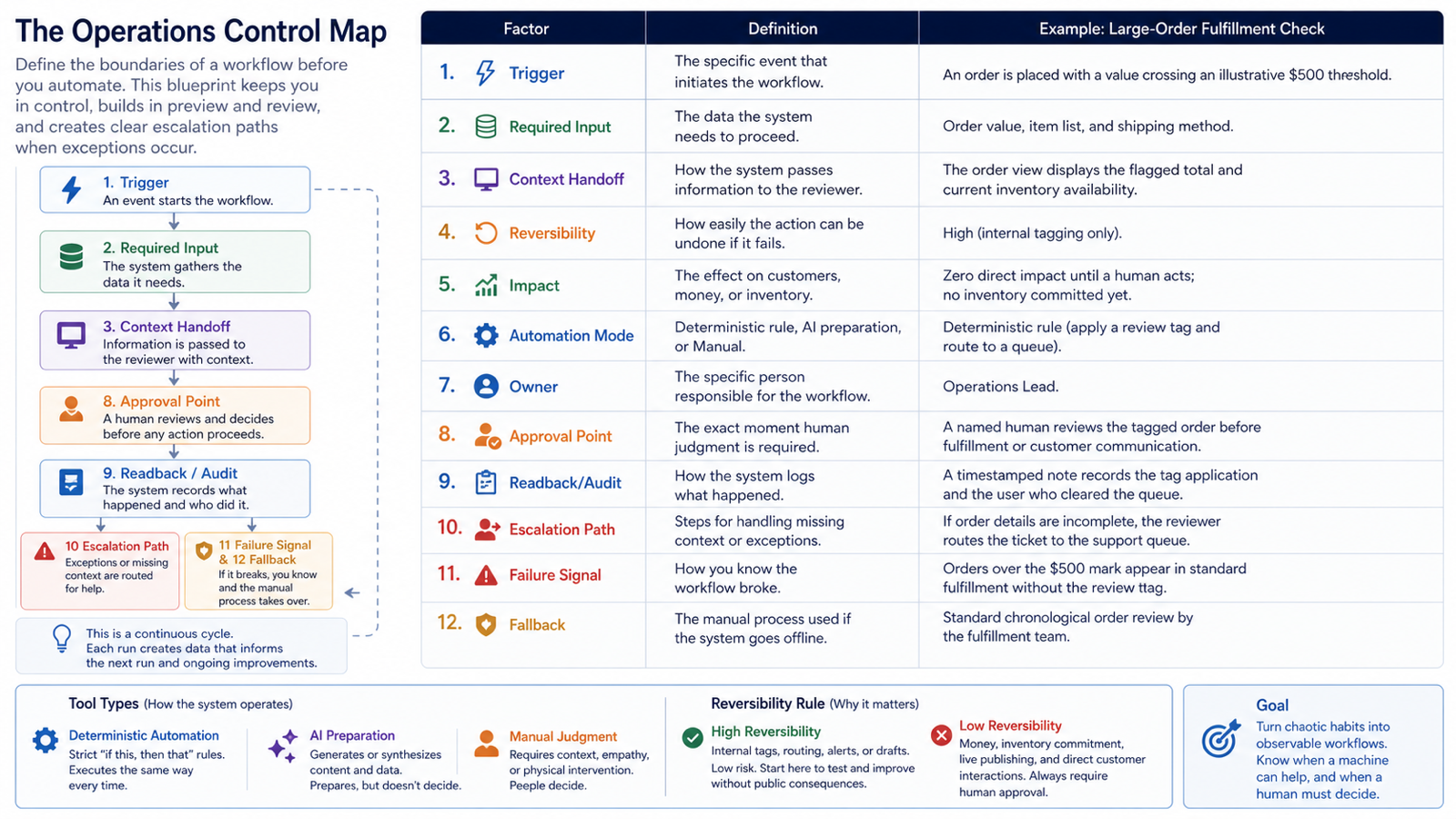
The Operations Control Map
To move a task from a chaotic habit to a structured process, you must define its boundaries. Before automating any recurring work, map it using the following criteria. This blueprint ensures you maintain judgment over critical business functions, build in a dry-run or preview step to test conditions, and establish clear escalation paths when exceptions occur.
Factor
Definition
Example: Large-Order Fulfillment Check
1. Trigger
The specific event that initiates the workflow.
An order is placed with a value crossing an illustrative $500 threshold.
2. Required Input
The data the system needs to proceed.
Order value, item list, and shipping method.
3. Context Handoff
How the system passes information to the reviewer.
The order view displays the flagged total and current inventory availability.
4. Reversibility
How easily the action can be undone if it fails.
High (internal tagging only).
5. Impact
The effect on customers, money, or inventory.
Zero direct impact until a human acts; no inventory committed yet.
6. Automation Mode
Deterministic rule, AI preparation, or Manual.
Deterministic rule (apply a review tag and route to a queue).
7. Owner
The specific person responsible for the workflow.
Operations Lead.
8. Approval Point
The exact moment human judgment is required.
A named human reviews the tagged order before fulfillment or customer communication.
9. Readback/Audit
How the system logs what happened.
A timestamped note records the tag application and the user who cleared the queue.
10. Escalation Path
Steps for handling missing context or exceptions.
If order details are incomplete, the reviewer routes the ticket to the support queue.
11. Failure Signal
How you know the workflow broke.
Orders over the $500 mark appear in standard fulfillment without the review tag.
12. Fallback
The manual process used if the system goes offline.
Standard chronological order review by the fulfillment team.
Choosing Your First Starting Point
When evaluating tools for small business automation, start with a single, highly observable internal workflow. Do not attempt to overhaul your entire fulfillment operation at once.
Look for high-frequency, low-risk tasks that focus on preparation and visibility rather than final execution. Good starting points include:
Internal Alerting: Using deterministic rules to flag low inventory thresholds or notify the team of shipping delays so a human can investigate.
Catalog Completeness Flags: Setting rules that place products missing weight or dimension data into a draft queue before they can be published.
Drafting Standard Content: Using AI preparation to format raw supplier data into readable product descriptions, which are then queued for human review and editing.
By keeping the initial scope narrow, you establish an observable process with high reversibility. You define the trigger, preview the execution path in a test environment, and ensure proper context handoff to a reviewer. This approach relies on human in the loop automation, meaning a named owner always provides human review and approval, checks the readback/audit logs, and handles the escalation path when the system encounters an exception. If the failure signal flashes, your manual fallback simply takes over.
To begin, select one internal alert or catalog-flagging task you currently perform manually every week, map its required inputs and approval point on paper, and configure it in a test environment to watch it run safely before applying it to live product and operating data.
Frequently Asked Questions
Can I use an AI tool to automatically process customer refunds and handle complaints?
No, handing over the authority for financial transactions, inventory commitments, or direct customer interactions to an autonomous system introduces unacceptable business risk. Generative AI tools lack an understanding of truth, and tasks like issuing refunds are highly irreversible and require context, empathy, and manual judgment. Restrict automation in these areas to drafting or preparing information, and require explicit human approval and a clear escalation path before any final action is executed.
What is the safest way to start automating my ecommerce operations?
The safest approach is to begin with high-frequency, low-risk internal workflows that focus on preparation and visibility. Internal tasks—such as using deterministic rules to flag low inventory or generative tools to draft unshown product descriptions—have high reversibility, meaning that if the system fails, the customer never sees it and no capital is lost. Select a single internal task you currently perform manually every week, map its boundaries, and configure it in a test environment to watch it run safely before applying it to live operations.
How do I ensure my automated workflows don't break my business if something goes wrong?
You must establish an operations control map for every automated task, requiring a "human in the loop" to review and approve critical steps. This ensures that you maintain judgment over important functions and have a plan for when the system inevitably encounters an exception. For every automated workflow, explicitly define its failure signal, assign a named human owner to check audit logs, and document the manual fallback process that your team will use if the system goes offline.