Why Your Industrial Website Is Missing Qualified RFQs
Diagnose breaks in the B2B buyer journey. Examine your site’s technical specifications, trust signals, and inquiry friction to find out what is stopping purchasing managers from requesting a quote.
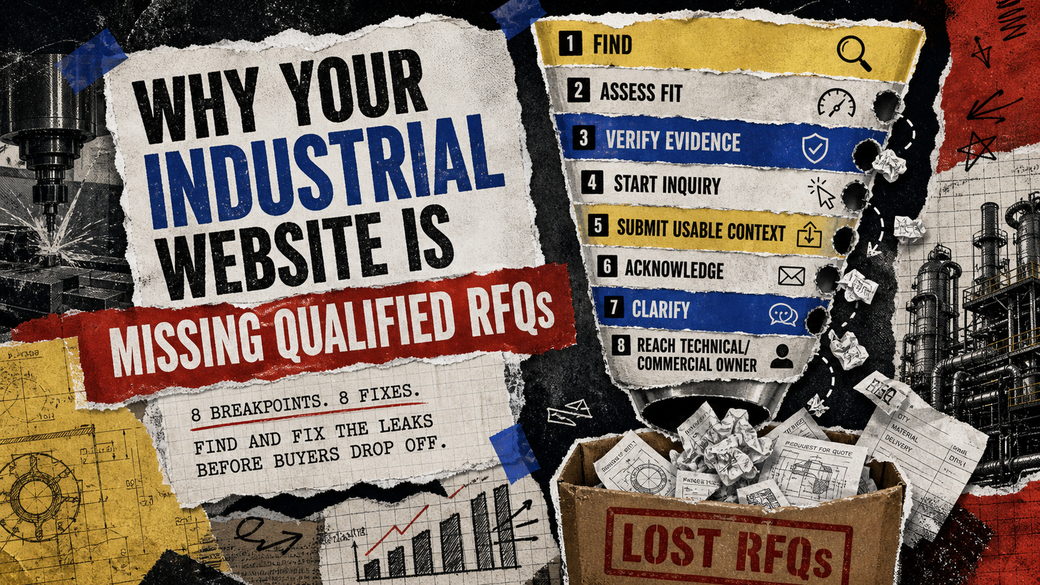
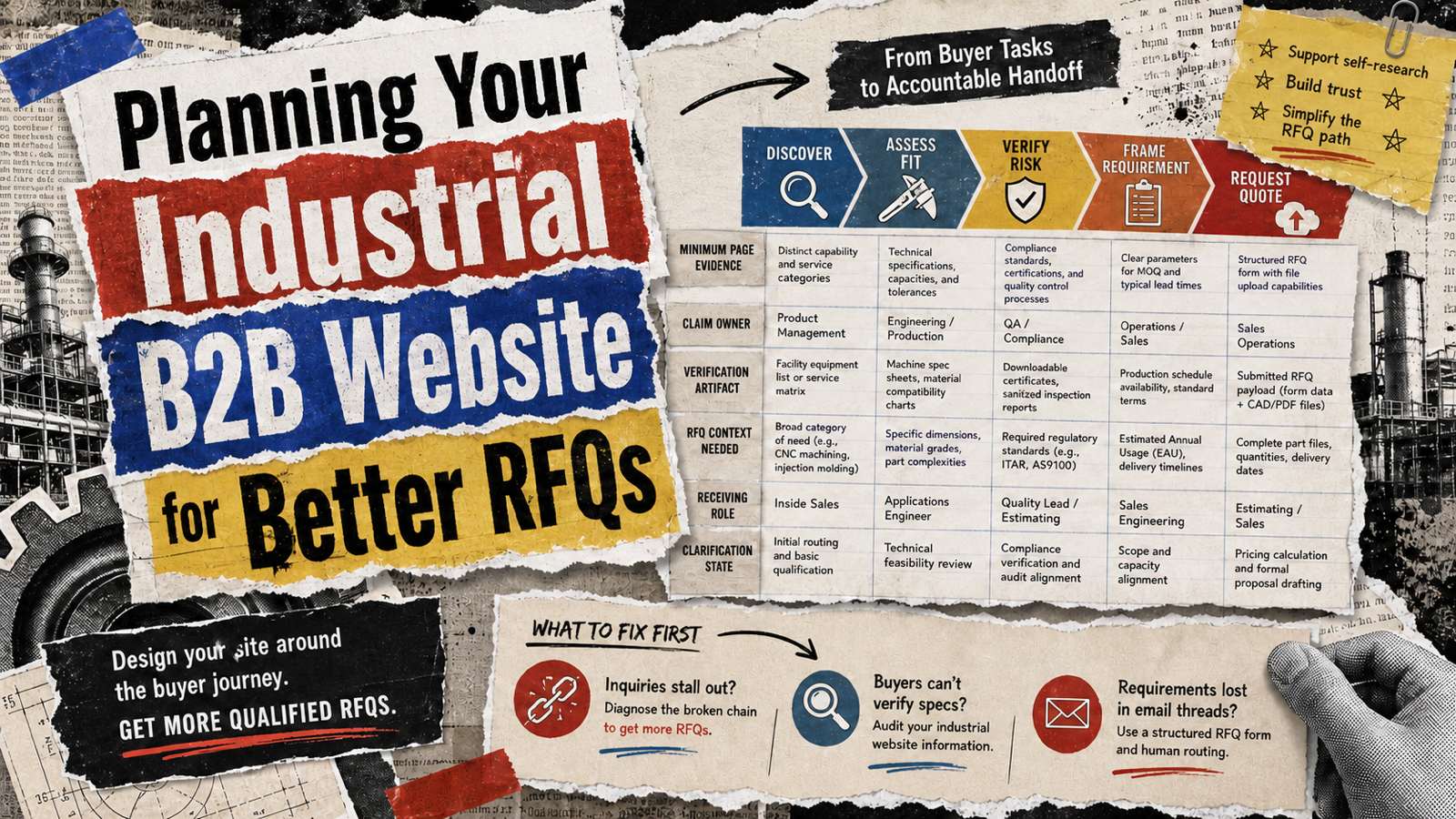
A manufacturing website that generates traffic but yields only sparse, mismatched, or technically incomplete inquiries is failing a structural procurement test. B2B buyers do not shop for industrial capabilities the way consumers buy commodities. They source against rigid requirements—tolerances, material grades, minimum runs, and certifications.
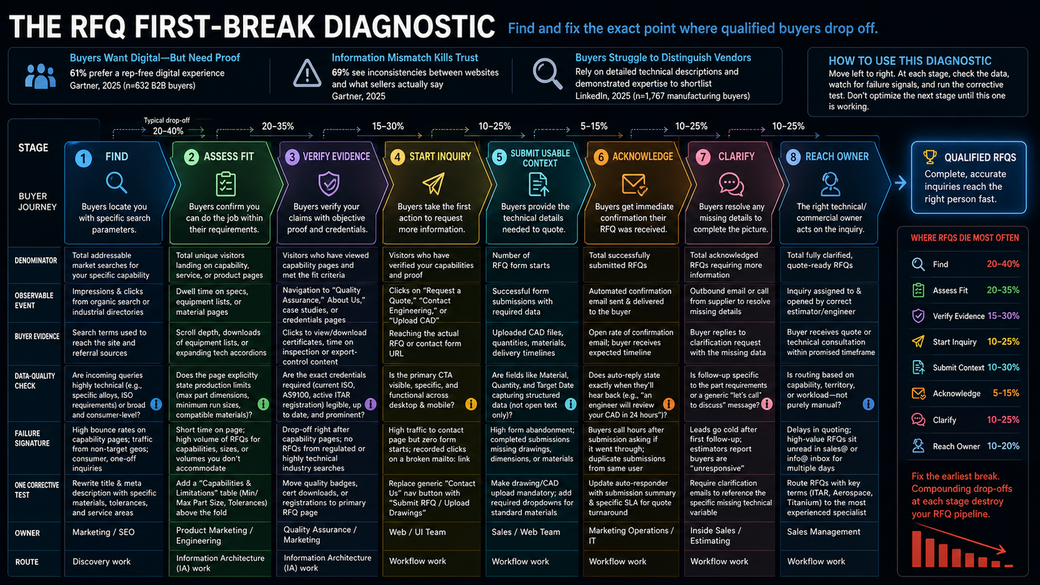
According to a 2025 Gartner Sales Survey of 632 B2B buyers, 61% prefer a rep-free digital experience, yet they rely heavily on seller input for contextual fit. A major friction point? 69% of those buyers reported inconsistencies between website information and what sellers actually say. Furthermore, a 2025 LinkedIn survey of 1,767 manufacturing buyers found that buyers struggle to distinguish between vendors, relying on detailed technical descriptions and demonstrated expertise to make shortlisting decisions. If your website lacks this depth, buyers will self-disqualify or submit vague, low-value forms.
To fix an empty or spam-filled RFQ pipeline, you must locate the exact breaking point in the buyer's evaluation process. The following diagnostic isolates where relevant industrial buyers fail to progress, moving from initial discovery through technical verification, and finally to human handoff.
The RFQ First-Break Diagnostic
Stage 1: Find
Before a buyer can evaluate a supplier, they must locate them using specific parameters. Platforms like Thomasnet structure this discovery by filtering suppliers by product, capability, service, location, and certifications, connecting precise capabilities to RFQ intent. Your organic presence must mimic this precision.
Denominator: Total addressable market searches for your specific capability (e.g., "5-axis CNC machining titanium").
Observable Event: Impressions and clicks from organic search or industrial directories.
Buyer Evidence: The specific search terms used to reach the site and the referral sources.
Data-Quality Check: Are incoming queries highly technical (e.g., specific alloys, ISO requirements) or broad and consumer-level?
Failure Signature: High bounce rates on capability pages; traffic originating from non-target geographies; inquiries for consumer, one-off projects.
Owner: Marketing / SEO.
One Corrective Test: Rewrite a primary capability page title and meta description to include specific materials, tolerances, and geographic service areas rather than generic terms.
Route: Discovery work.
Stage 2: Assess Fit
Once a buyer lands on your site, they need to know if you can actually do the job.
Denominator: Total unique visitors landing on capability, service, or product pages.
Observable Event: Dwell time on technical specifications, equipment lists, or material pages.
Buyer Evidence: Scroll depth, downloading an equipment list, or expanding technical accordions.
Data-Quality Check: Does the page explicitly state production limits (e.g., maximum part dimensions, minimum run sizes, compatible materials)?
Failure Signature: Short time on page; a high volume of RFQs for capabilities, sizes, or volumes you do not accommodate.
Owner: Product Marketing / Engineering.
One Corrective Test: Add a clear "Capabilities and Limitations" table (e.g., Min/Max Part Size, Tolerances) above the fold on your highest-traffic service page.
Route: Information Architecture (IA) work.
Stage 3: Verify Evidence
Before initiating an RFQ on an industrial B2B website, buyers must verify that your technical claims are backed by objective proof. They are looking for the specific quality credentials or operational registrations their project actually requires.
Denominator: Visitors who have viewed capability pages and met the fit criteria.
Observable Event: Navigation to "Quality Assurance," "About Us," case studies, or credentials pages.
Buyer Evidence: Clicks to view or download certification PDFs, time spent reading inspection methodologies, or verifying relevant export-control status.
Data-Quality Check: Are the exact credentials your target buyers require—whether that is a current ISO or AS9100 certificate, or proof of an active ITAR registration—legible, up to date, and prominently displayed?
Failure Signature: Sudden drop-off immediately after viewing capability pages; failure to capture RFQs from searches related to regulated or highly technical industries.
Owner: Quality Assurance / Marketing.
One Corrective Test: Move relevant quality badges, current certificate downloads, or registration statements directly to the primary RFQ submission page so proof is visible at the point of action.
Route: Information Architecture (IA) work.
Stage 4: Start Inquiry
The transition from reading to requesting action must be frictionless.
Denominator: Visitors who have verified your capabilities and proof.
Observable Event: Clicks on "Request a Quote," "Contact Engineering," or "Upload CAD."
Buyer Evidence: Reaching the actual RFQ or contact form URL.
Data-Quality Check: Is the primary call-to-action visible, specific, and functional across both desktop and mobile devices?
Failure Signature: High traffic to the contact page but zero form starts; recorded clicks on a broken mailto: link.
Owner: Web / UI Team.
One Corrective Test: Replace a generic "Contact Us" navigation button with a specific "Submit RFQ / Upload Drawings" button.
Route: Workflow work.
Stage 5: Submit Usable Context
A form submission is useless if it lacks the data required to generate an estimate.
Denominator: Number of RFQ form starts.
Observable Event: Successful form submissions containing required technical data.
Buyer Evidence: Uploaded CAD files, specified production quantities, material selections, and delivery timelines.
Data-Quality Check: Are fields like "Material," "Quantity," and "Target Date" capturing structured data, or are buyers forced to type everything into a single open text box?
Failure Signature: High form abandonment rate; completed submissions that lack drawings, critical dimensions, or material specifications.
Owner: Sales / Web Team.
One Corrective Test: Make the drawing/CAD upload field mandatory, or introduce a required dropdown menu for standard material grades.
Route: Workflow work.
Stage 6: Acknowledge
Procurement professionals need immediate confirmation that their sensitive files and data have been received by a legitimate vendor.
Denominator: Total successfully submitted RFQs.
Observable Event: Automated confirmation email sent and successfully delivered to the buyer.
Buyer Evidence: Open rate of the confirmation email; buyer receives an expected timeline for the quote.
Data-Quality Check: Does the auto-reply state exactly when they will hear back (e.g., "an engineer will review your CAD file within 24 hours"), or is it a generic "thanks for reaching out" message?
Failure Signature: Buyers calling the main office shortly after submission asking if the form went through; duplicate form submissions from the same user.
Owner: Marketing Operations / IT.
One Corrective Test: Update the auto-responder to include a summary of the submission details and a specific SLA (Service Level Agreement) for the quote turnaround time.
Route: Workflow work.
Stage 7: Clarify
Seldom is an RFQ perfect on the first submission. The supplier must bridge the gap between what was submitted and what is required to quote.
Denominator: Total acknowledged RFQs requiring more information to estimate.
Observable Event: Outbound email or call from the supplier to the buyer to resolve missing details.
Buyer Evidence: Buyer replies to the clarification request with the missing data.
Data-Quality Check: Is the follow-up specific to the part requirements, or is it a generic "let's get on a call to discuss your needs"?
Failure Signature: Leads go completely cold after the first follow-up; sales estimators complain that buyers are "unresponsive."
Owner: Inside Sales / Estimating.
One Corrective Test: Mandate that clarification emails reference the specific missing technical variable (e.g., "What is the surface finish requirement for Part A?") rather than asking for a general introductory meeting.
Route: Workflow work.
Stage 8: Reach Technical/Commercial Owner
The final failure point is internal: qualified, clarified data sitting idle.
Denominator: Total fully clarified, quote-ready RFQs.
Observable Event: The inquiry is assigned to and opened by the correct estimator, engineer, or account manager.
Buyer Evidence: The buyer receives the actual quote or technical consultation within the promised timeframe.
Data-Quality Check: Is the routing logic based on actual capability, territory, or workload, or is it purely manual?
Failure Signature: Delays in quoting; high-value RFQs sitting unread in a generic sales@ or info@ inbox for multiple days.
Owner: Sales Management.
One Corrective Test: Implement a routing rule that sends RFQs containing specific high-value keywords (e.g., "ITAR," "Aerospace," or "Titanium") directly to your most experienced specialized estimator.
Route: Workflow work.
Frequently Asked Questions
Why am I getting RFQs for consumer projects or capabilities I do not offer?
This typically occurs when your website relies on generic terms rather than specific technical parameters. You can address this by updating your page titles and meta descriptions to include precise materials, tolerances, and service areas. Additionally, adding a clear "Capabilities and Limitations" table above the fold allows buyers to see your minimum run sizes and maximum part dimensions, helping them self-qualify before starting an inquiry.
How can I stop buyers from submitting incomplete RFQ forms?
Buyers will submit incomplete data if they are only provided with a single open text box. To capture usable context, your form needs to capture structured data. You can correct this by making the drawing or CAD upload field mandatory and introducing required dropdown menus for standard material grades.
Why do leads go cold after they submit an initial form?
Leads often drop off if your follow-up process lacks technical context or fails to set immediate expectations. Ensure your automated confirmation email provides a specific timeline for when an engineer or estimator will review their file. If the RFQ is incomplete, your initial follow-up should specifically reference the missing technical variable—such as a surface finish requirement—rather than asking for a generic introductory meeting.