Ecommerce Tech Stack Guide for DTC Brands in 2026
A practical framework for choosing an ecommerce tech stack when your brand needs localized storefronts, structured product data, AI shopping visibility, and daily operating control.
Read more
A practical framework for small businesses deciding between selling on a marketplace or launching an owned website. Evaluate your operations based on customer acquisition, total costs, data ownership, and technical resources before committing to a platform.

Choosing how to sell online is rarely a software decision. It is an operational commitment. When small businesses run into friction with their ecommerce setups eighteen to twenty-four months after launch, the root cause is seldom a missing software toggle or an unappealing theme. More often, the business chose an architecture that assumes one operating model while running another.
A merchant selling custom, high-consideration furniture faces entirely different economics, traffic requirements, and fulfillment workflows than a seller moving standard replacement parts or high-volume handmade goods. Selecting a channel based primarily on how fast you can launch or which vendor tops an affiliate review list creates structural debt.
To build a durable sales architecture, you must evaluate three core operating models—marketplace-first, owned-store-first, and hybrid selling—against your unit economics, acquisition capacity, technical overhead, and policy exposure over a multi-year horizon.
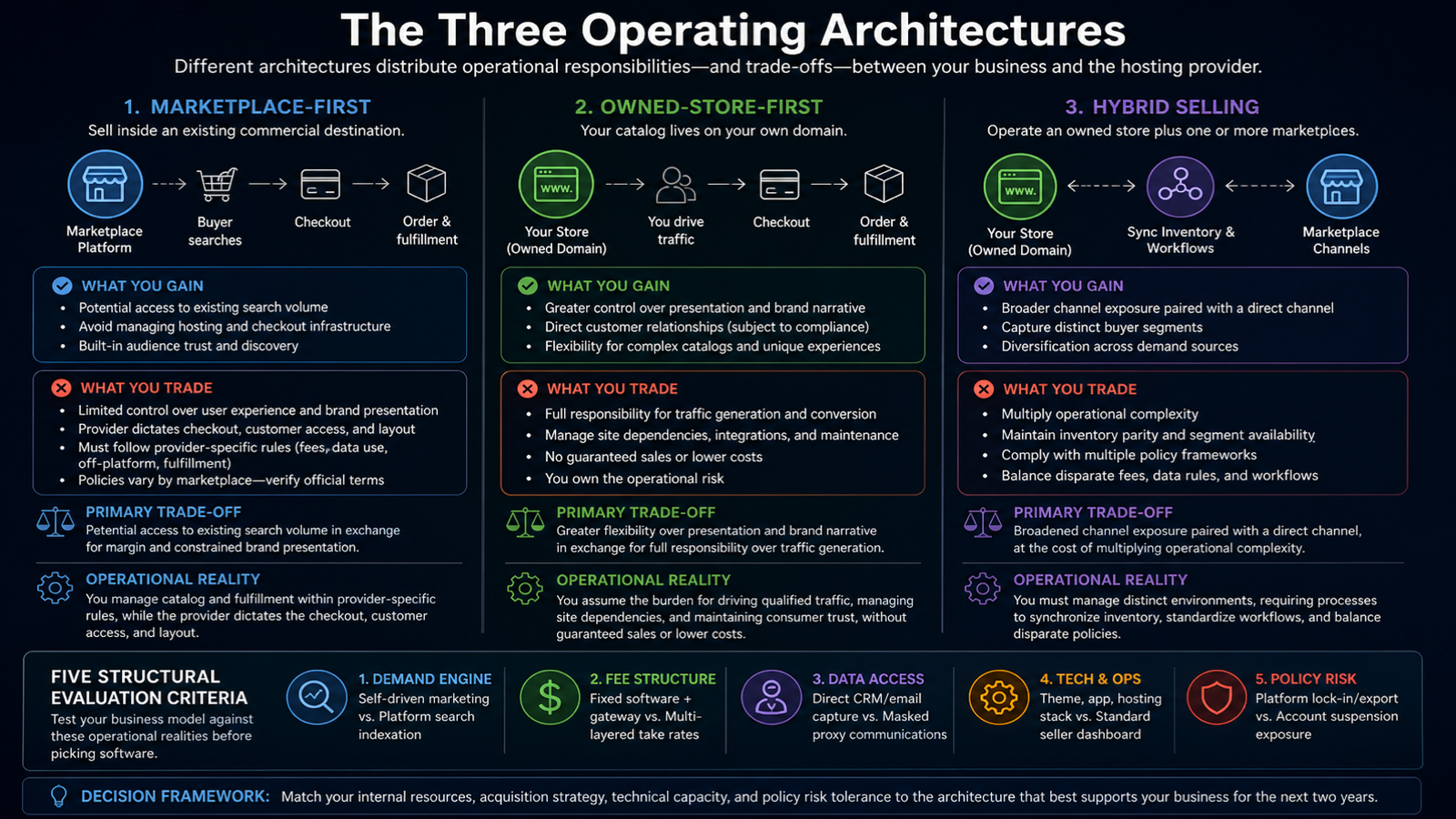
Every ecommerce setup distributes operational responsibilities differently between your business and the hosting provider. Selecting the right setup requires matching your internal resources and acquisition strategy to the structural realities of a chosen path.
| Architecture | Primary Trade-Off | Operational Reality |
|---|---|---|
| Marketplace-First | Potential access to existing search volume in exchange for margin and constrained brand presentation. | You manage catalog and fulfillment within provider-specific rules, while the provider dictates the checkout, customer access, and layout. |
| Owned-Store-First | Greater flexibility over presentation and brand narrative in exchange for full responsibility over traffic generation. | You assume the burden for driving qualified traffic, managing site dependencies, and maintaining consumer trust, without guaranteed sales or lower costs. |
| Hybrid Selling | Broadened channel exposure paired with a direct channel, at the cost of multiplying operational complexity. | You must manage distinct environments, requiring processes to synchronize inventory, standardize workflows, and balance disparate policies. |
In a marketplace-first setup, your catalog lives inside an existing commercial destination. You may gain access to buyers actively searching the platform, but this traffic is not guaranteed. You typically surrender control over the user experience and customer relationship mechanics. While you avoid managing hosting and checkout infrastructure, marketplace service, communication, fulfillment, data-use, and off-platform rules are highly provider-specific and must be checked directly in current official terms. For example, current Etsy policy explicitly restricts moving an Etsy-initiated transaction off the platform. You must evaluate these individual provider terms rather than assuming universal marketplace standards apply across all channels.
In an owned-store model, your catalog lives on a dedicated domain. You gain a larger degree of control over the site's layout and checkout flow, but an owned website does not bring its own traffic, automatically eliminate provider dependencies, or guarantee independence. Launching an owned store means you are fully responsible for independent customer acquisition. Your operational focus shifts from navigating marketplace search algorithms to managing digital marketing, maintaining technology integrations, and establishing your own baseline of consumer trust.
A hybrid approach pairs an owned storefront with one or more third-party marketplace channels. Businesses use this model in an attempt to capture distinct buyer segments, but it significantly increases operational complexity. Rather than acting as an automatic policy buffer or a simple conversion funnel, a hybrid setup requires maintaining inventory parity, segmenting product availability, and strictly observing each marketplace's policies while running your own independent direct-to-consumer workflows.
Before picking software, test your business model against these five operational realities.
| Criterion | Operating tension |
|---|---|
| Demand Engine | Self-driven marketing vs. Platform search indexation |
| Fee Structure | Fixed software + gateway vs. Multi-layered take rates |
| Data Access | Direct CRM/email capture vs. Masked proxy communications |
| Tech & Ops | Theme, app, hosting stack vs. Standard seller dashboard |
| Policy Risk | Platform lock-in/export vs. Account suspension exposure |
Marketplaces may expose your product listings to existing, high-intent search demand, though visibility and traffic are never guaranteed. If your product solves a search-driven utility need, listing where consumers already browse can be a strategic starting point.
Conversely, an owned store requires an independent acquisition engine. Launching an owned domain means you are responsible for building and measuring your own traffic funnels to generate visits. If your products require detailed education, complex configuration, subscriptions, bundling, or wholesale logic, you must conduct a provider-specific capability check. Do not assume that every marketplace lacks these presentation options, nor that every owned platform automatically supports them without additional integrations or development.
Ecommerce costs extend beyond the initial software subscription or basic listing price. To evaluate a channel, you must model the complete financial burden of its required operating setup over your business horizon.
On a marketplace, total channel costs generally involve multiple layered fee types. For example, under current Etsy policy, a seller's economics are determined by several distinct, separate fee types—such as listing fees, transaction fees, and payment processing fees—rather than a single universal percentage. Because these fee models are subject to regular updates, businesses must verify official terms rather than relying on assumed fixed margins.
Operating an owned store shifts the nature of these expenses but does not inherently guarantee lower costs. As outlined in Shopify's 2026 ecommerce website cost guide, total cost of ownership spans far beyond the base platform; it can include the domain, hosting, design and development, payment processing, applications, ongoing maintenance, fulfillment, and returns. The apps, integrations, operational services, and specific business model you employ will materially change this total cost.
Regardless of the channel, you must construct a total cost of ownership (TCO) model that accounts for applicable current fees, required staff labor, essential integrations, fulfillment operations, returns management, and the eventual work required for future exit or migration.
How you capture, access, and utilize customer information dictates your ability to run retention marketing and repeat-sales campaigns.
An owned channel offers broader opportunities for direct data capture, but it does not guarantee unrestricted marketing rights or mean the data is entirely "yours" without strings attached. Access, permitted use, consumer consent requirements, and the ultimate portability of that data depend heavily on your chosen platform's contracts, your specific implementation, and applicable privacy obligations. Conversely, while marketplaces generally restrict direct communication to protect buyer trust and prevent disintermediation, the specific degree of data masking, allowed usage, and export capability varies by provider.
Additionally, sellers must account for regulatory compliance overhead. Under current US federal guidance for the INFORM Consumers Act, covered high-volume third-party sellers face statutory marketplace collection, verification, annual certification, disclosure, and suspension processes. Marketplaces may also impose compliance measures that exceed this federal statutory floor. Sellers operating on these platforms should review current FTC guidance and official platform notices to understand their disclosure exposure and operational risks, rather than assuming standard consumer privacy norms apply.
Consider how much time your team can allocate to software maintenance versus core product operations. Technical responsibility is rarely an all-or-nothing binary; the actual division of labor depends entirely on your specific marketplace, hosted platform, self-hosted technology stack, service contracts, third-party integrations, and internal staffing model. Furthermore, no channel or provider entirely removes your overarching responsibility for payment security, consumer privacy, or business compliance.
Before committing to a setup, give your team a concrete responsibility inventory to verify exactly who holds operational control across the following layers:
Platform risk represents the vulnerability of your sales operations to third-party policy changes, shifting compliance rules, or account disruptions. While owning a domain and brand asset provides strategic equity, it is distinct from controlling the underlying hosting, managing payment gateways, owning data-use permissions, or possessing a portable technical implementation.
Account actions, notice and appeal procedures, and data availability are highly provider- and implementation-dependent and must be verified in your current contracts and official documentation. Similarly, the ability to export data, themes, configurations, and integrations varies significantly by provider and your specific setup. Do not assume universal portability for databases or design templates.
Before committing to any software or marketplace channel, conduct a concrete pre-commit exit test to understand your migration path if your business model outgrows the platform. Verify the following:
Evaluate your operational capabilities against this comparative matrix to help identify an appropriate primary channel architecture.
| Evaluation Dimension | Marketplace-First Path | Owned-Store-First Path | Hybrid Path |
|---|---|---|---|
| Primary Demand Source | Reliant on internal platform search visibility and category browsing | Reliant on self-driven traffic (SEO, paid acquisition, email, existing brand awareness) | Balances marketplace search exposure with independent direct acquisition efforts |
| Brand & Presentation Control | Provider-dependent; constrained to standardized layouts and product page templates | Implementation-dependent; flexible control over narrative, user experience, and visual layout | Bifurcated; controlled brand presence on the owned store, standardized templates on marketplaces |
| Customer Relationship Access | Provider-dependent; often limited by masked contact info and restrictions on off-platform marketing | Implementation-dependent; relies on compliant consent capture for email/CRM usage | Fragmented; requires managing distinct communication rules for marketplace buyers versus direct buyers |
| Catalog & Fulfillment Complexity | Provider-dependent; the allowed catalog model, variations/configuration, quoting, subscriptions/bundles, fulfillment rules, inventory coordination, and returns are governed by specific marketplace capabilities. | Implementation-dependent; capabilities for the catalog model, variations/configuration, quoting, subscriptions/bundles, fulfillment rules, inventory coordination, and returns rely entirely on your chosen software stack. | Complex; retains all provider and implementation dependencies while adding the operational burden of cross-channel inventory coordination and returns reconciliation. |
| Underlying Fee Model | Provider-dependent; often a combination of listing, transaction, processing, and advertising fees | Provider-dependent; spans hosting, platform, development, apps, maintenance, and processing | Blended overhead; combines recurring infrastructure costs with variable marketplace fees |
| Required Integrations | Varies; may require listing tools or basic multi-channel connectors | Varies; requires assembling payment, shipping, analytics, and marketing applications | High; typically requires dedicated multi-channel inventory and order-routing systems |
| Internal Staff Time Focus | SLA compliance, standard customer support, and in-platform search optimization | Independent marketing, technical maintenance, direct fulfillment, and conversion optimization | Inventory reconciliation, managing multiple policy frameworks, and diverse operational workflows |
| Policy & Account Exposure | Provider-dependent; covered high-volume third-party sellers face INFORM Act collection, verification, annual certification, disclosure, and suspension processes, and marketplaces may impose additional measures | Provider/Host-dependent; subject to infrastructure terms of service, payment provider rules, and shifting compliance obligations | Dispersed; operational disruption on one channel does not automatically close all distribution avenues, but provider policies and statutory rules still apply |
| Data Export & Portability | Provider-dependent; often limits bulk export of consumer contact or behavioral data | Implementation-dependent; portability of databases, designs, and content varies heavily by underlying software | Complex; owned assets may be exportable while marketplace data remains bound to the third party |
| Typical Migration Trigger | Provider policy changes, constrained repeat marketing capabilities, or changing unit economics | Unsustainable acquisition costs, technical debt, or the need for a diversified sales funnel | Operational fragmentation, inventory sync failures, or unsustainable back-office labor requirements |
Your decision should align with your business model, acquisition capacity, and operational staff time. Rather than treating this as a simple binary choice, use your primary operational constraints to determine a resilient path forward for the next two years.
Selecting a sales channel establishes a two-year operational commitment. Once you identify the architecture that matches your capabilities, document a concrete migration trigger—a specific revenue threshold, customer acquisition cost metric, or inventory milestone—that will dictate when your business is ready to re-evaluate its setup. By modeling your true total cost of ownership and aligning your technical, policy, and data requirements upfront, you build a sales architecture that supports how your business actually operates today.
Not necessarily. While a marketplace setup avoids the costs of managing hosting and checkout infrastructure, it subjects your business to multi-layered, provider-specific fee types—such as listing, transaction, and payment processing fees—that directly impact margins. Operating an owned store shifts expenses to domain, hosting, development, apps, and ongoing maintenance, meaning the cost structure changes rather than vanishes. Build a total cost of ownership (TCO) model for both paths that accounts for all applicable platform fees, necessary integrations, and required staff labor to determine the true financial burden for your business.
An owned channel does provide broader opportunities for direct data capture compared to masked marketplace communications, but it does not mean the data is entirely unrestricted or perfectly portable. Your access, permitted marketing use, and the portability of that data will depend heavily on your chosen software platform's contracts, your specific technical implementation, and applicable privacy obligations. Review your platform's data export capabilities and ensure you have compliant consent capture processes configured for your email and CRM usage.
A hybrid approach—pairing an owned storefront with one or more third-party marketplaces—is only appropriate if you have the technical resources and staff time to manage multiplied operational complexity. This model demands synchronizing cross-channel inventory, segmenting catalogs, and strictly adhering to disparate marketplace policies while running your own independent workflows. You should only pursue a hybrid setup if you possess dedicated multi-channel inventory routing systems and can maintain strict compliance with all distinct platform rules without disrupting your core operations.